
AeroWeather Menu Bar
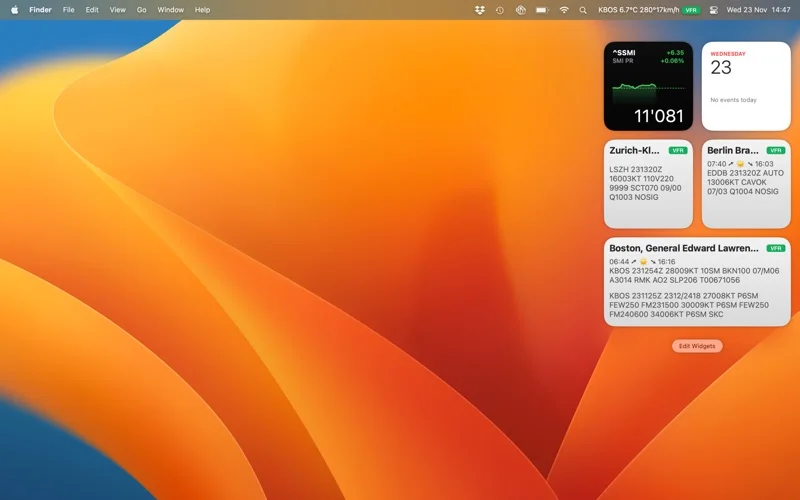
AeroWeather Menu Bar puts airport METAR and TAF reports in a Mac menu-bar viewer, with raw and decoded displays.
Pick as a convenient airport-weather reference alongside authoritative flight planning.
A favorite-station menu display and sortable airports make recurring checks easy to reach.
Keep in mind: The developer says freely sourced weather cannot be guaranteed. Check report time and official briefing sources before operational decisions; the menu-bar edition is smaller than AeroWeather Pro.
Inside the app
Official product images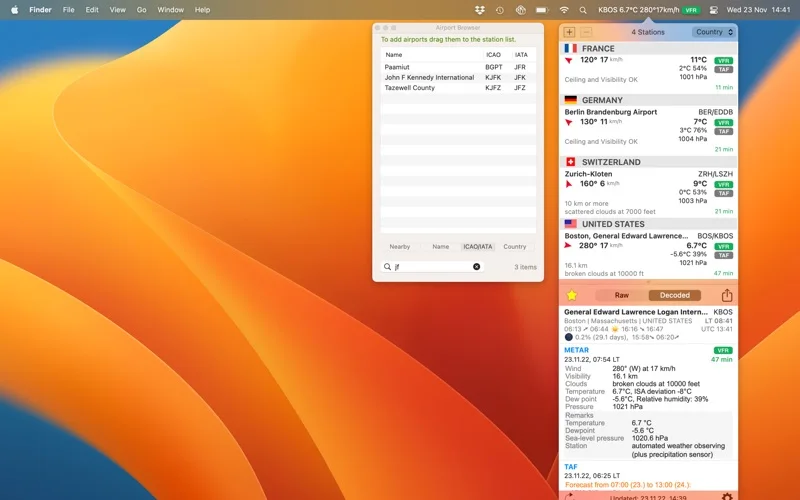
What you can do
- Display raw or decoded METAR and TAF
- Rotate favorite airports and customize units
- Read reports aloud and export station lists
Good for
- Pilots and aviation enthusiasts seeking a supplementary desktop weather view.
Consider alternatives for
- Anyone relying on one unverified display as a complete preflight briefing.
Limitations & considerations
- Captured minimum: macOS 12.0.
- The developer says freely sourced weather cannot be guaranteed. Check report time and official briefing sources before operational decisions; the menu-bar edition is smaller than AeroWeather Pro.
Privacy & permissions
Weather requests and any shared reports involve external services or selected destinations. Exported station lists may reveal travel interests; this is not an offline weather guarantee.
Sources & review notes Updated Nov 15, 2026
Reviewed by iApp4Me Editorial Team. Recommendations use the linked documentation and attributed accounts; device observations are identified separately.
- US App Store developer description
Complete description, release notes, download price and compatibility metadata captured 2026-11-02.
- Official developer disclosure
Full official cached text reviewed; captured 2026-11-12. Platform, edition and data limitations retained in the profile.
No comments yet. Be the first to share your experience.