
Bear
A writing and note-taking app with Markdown support, tags and links between notes.
About Bear
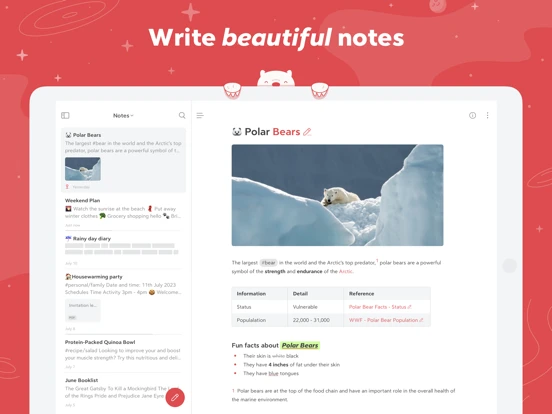
Bear keeps writing in Markdown notes and organizes them with nested tags. Notes can contain tables, tasks, sketches and attachments, while links and backlinks connect related ideas. Its developer also describes web clipping, a document outline and export tools, making the same library useful for quick capture and longer writing projects.
- Organize writing with nested tags
- Connect related notes and references
- Combine formatted text, sketches and attachments
Bear is a beautiful, powerfully simple Markdown app to capture, write, and organize your life. Take notes, plan your day, journal thoughts, organize tables,…From the developer’s App Store description
Inside the app
Official product images


App Store review themes
Recurring praise and complaints, grouped by topic.
44 reviews · US App Store · Written feedback; review platforms are not identified
What reviewers like
Ease of use
15 reviewsThe reviewer likes the clean, efficient note interface.
See 2 review examples
The reviewer likes the clean, efficient note interface.
Original excerpt“super clean interface”Apple source · Review 14556779334
The reviewer finds menus intuitive and uncluttered.
Original excerpt“The way menus are built is so intuitive.”Apple source · Review 14313310377
File organization
10 reviewsThe reviewer values hierarchical organization while noting it requires patience and rearrangement.
See 2 review examples
The reviewer values hierarchical organization while noting it requires patience and rearrangement.
Original excerpt“organize info under appropriate headers, and sub-headers”Apple source · Review 14576915821
The reviewer values hashtag categorization.
Original excerpt“label them with hashtags to help categorize things”Apple source · Review 14556779334
Customization
6 reviewsThe reviewer likes themes.
See 2 review examples
The reviewer likes themes.
Original excerpt“different themes available”Apple source · Review 14316041474
The reviewer values broad appearance customization.
Original excerpt“You can customize everything.”Apple source · Review 14313310377
What reviewers dislike
Editing documents
6 reviewsThe reviewer reports table selection resetting before adding or removing rows or columns, causing changes in the wrong place.
See 2 review examples
The reviewer reports table selection resetting before adding or removing rows or columns, causing changes in the wrong place.
Original excerpt“it’s automatically moved to the first top-left box in the table”Apple source · Review 14728592990
The reviewer wants more text formatting options.
Original excerpt“text and paragraph formatting options are limited”Apple source · Review 14299694172
Lost files or work
5 reviewsThe reviewer reports web-written work being replaced by an older mobile version.
See 2 review examples
The reviewer reports web-written work being replaced by an older mobile version.
Original excerpt“it will erase whatever I wrote on the website and go back to the old version”Apple source · Review 14578756756
The reviewer reports losing notes after accepting a storage-related prompt and has no backup; the precise cause is not verified.
Original excerpt“EVERYTHING is deleted, not even in the trash can”Apple source · Review 14305261934
Import and export
3 reviewsThe reviewer reports paste options failing after an update, blocking copied-content editing.
See 2 review examples
The reviewer reports paste options failing after an update, blocking copied-content editing.
Original excerpt“no selected options work”Apple source · Review 13817958521
The reviewer wants custom HTML export styles.
Original excerpt“add or edit a CSS stylesheet file for the HTML export”Apple source · Review 13768591442
No comments yet. Be the first to share your experience.