
Control for Denon Marantz HEOS
Operate supported HEOS speakers or AV receivers from a Mac on the same network.
An owner of a network-connected HEOS-enabled speaker or receiver.
Operate supported HEOS speakers or AV receivers from a Mac on the same network.
Keep in mind: A compatible HEOS device connected by Wi-Fi or Ethernet is required. USB selection depends on hardware support; device firmware and current service login compatibility were not tested.
Inside the app
Official product images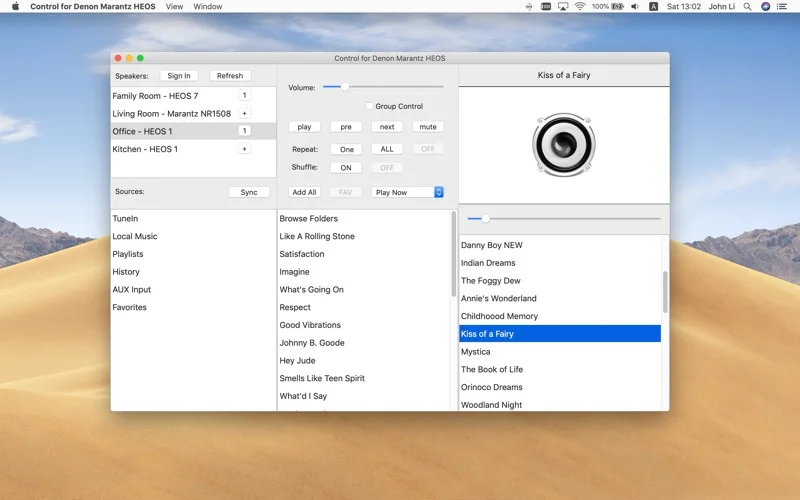
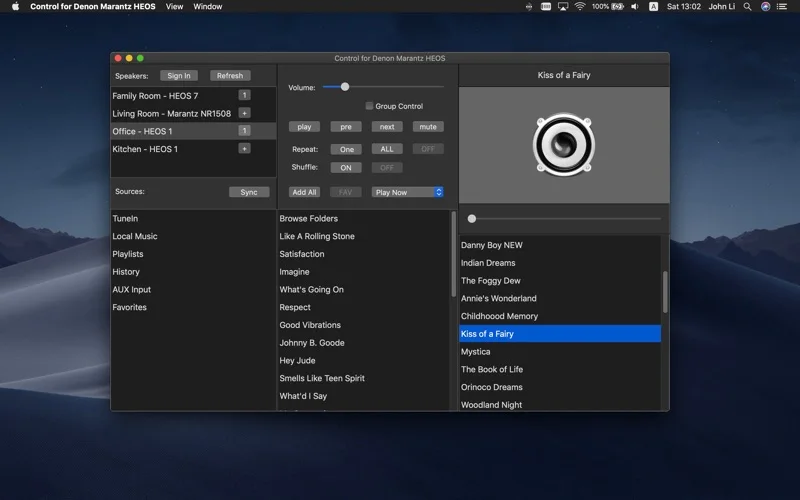
What you can do
- Discover HEOS devices automatically or refresh discovery.
- Adjust play/pause, mute, volume and input source.
- Browse supported radio/services or select USB music when the receiver supports it.
Good for
- An owner of a network-connected HEOS-enabled speaker or receiver.
Consider alternatives for
- A standalone audio player or guaranteed USB playback on unsupported hardware.
Limitations & considerations
- A compatible HEOS device connected by Wi-Fi or Ethernet is required. USB selection depends on hardware support; device firmware and current service login compatibility were not tested.
Privacy & permissions
Local-network discovery and media-source control reveal connected hardware and playback activity. Review permissions and provider accounts before enabling service access.
Sources & review notes Updated Nov 18, 2026
Reviewed by iApp4Me Editorial Team. Recommendations use the linked documentation and attributed accounts; device observations are identified separately.
- US App Store listing
Publisher description, version and US download price captured 2026-11-02; source-based coverage, not a device test.
No comments yet. Be the first to share your experience.