DevCleaner for Xcode
Inspect and selectively remove generated Xcode files and caches to reclaim storage.
Developers who understand which generated Xcode data they can safely recreate.
Inspect and selectively remove generated Xcode files and caches to reclaim storage.
Keep in mind: Removing caches or symbols can require later downloads or affect debugging workflows. Inspect candidates and preserve important data; no cleaning run or recovery test was performed.
Inside the app
Official product images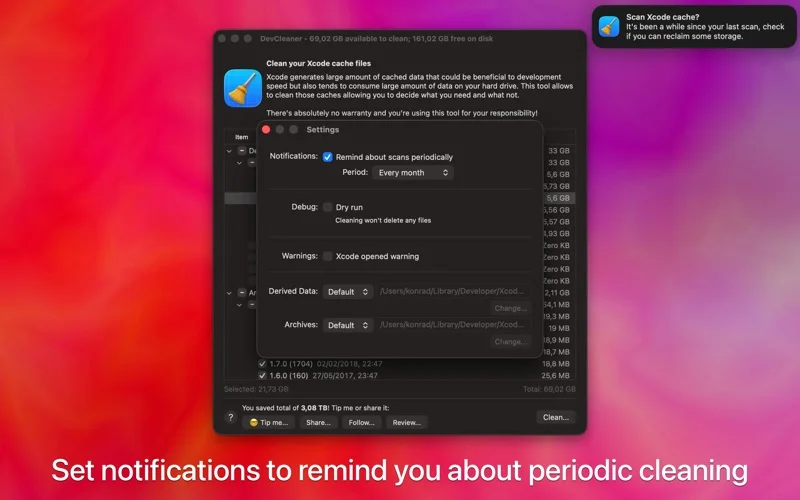
What you can do
- Scan generated content under the described developer-library area.
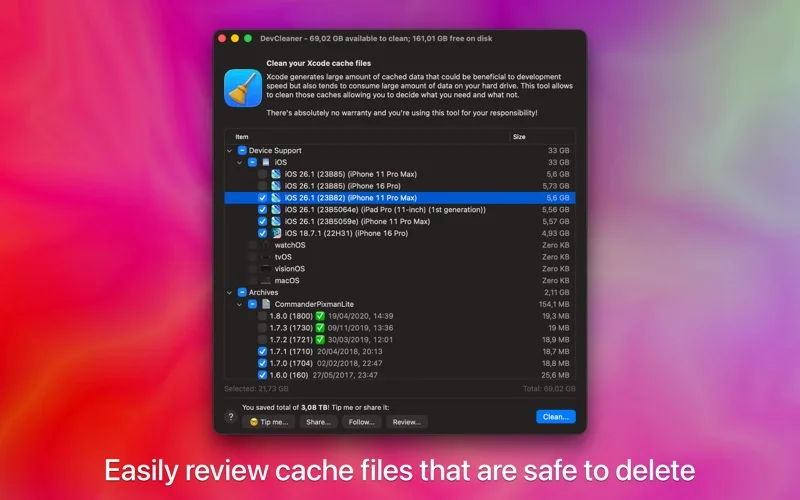
- Review cleaning candidates before removal.
- Use scan reminders or the included command-line tool in scripts.
Good for
- Developers who understand which generated Xcode data they can safely recreate.
Consider alternatives for
- A general Mac cleaner or a guarantee of reclaiming a fixed amount of disk space.
Limitations & considerations
- Removing caches or symbols can require later downloads or affect debugging workflows. Inspect candidates and preserve important data; no cleaning run or recovery test was performed.
Privacy & permissions
The tool needs access to developer files. Review permissions and selections carefully, especially in shared development environments; the description does not establish a no-telemetry guarantee.
Sources & review notes Updated Nov 17, 2026
Reviewed by iApp4Me Editorial Team. Recommendations use the linked documentation and attributed accounts; device observations are identified separately.
- US App Store listing
Publisher description and US download price captured 2026-11-02; source-based coverage, not a device test.
No comments yet. Be the first to share your experience.