Hex Fiend
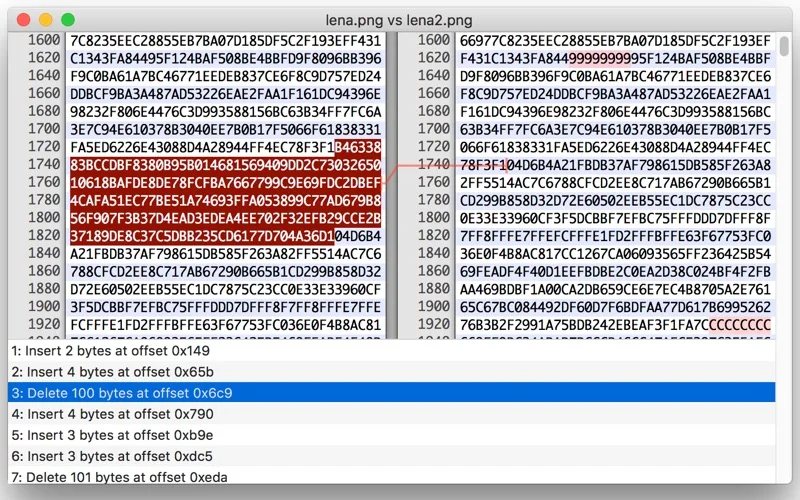
Inspect and edit binary files with byte insertion, deletion, searching and binary comparison.
Developers inspecting binary formats or comparing controlled copies of files.
Inspect and edit binary files with byte insertion, deletion, searching and binary comparison.
Keep in mind: Byte edits can irreversibly damage a file format. Work on a copy and verify output; large-file limits, speed and the no-temporary-space claim were not independently tested.
Inside the app
Official product images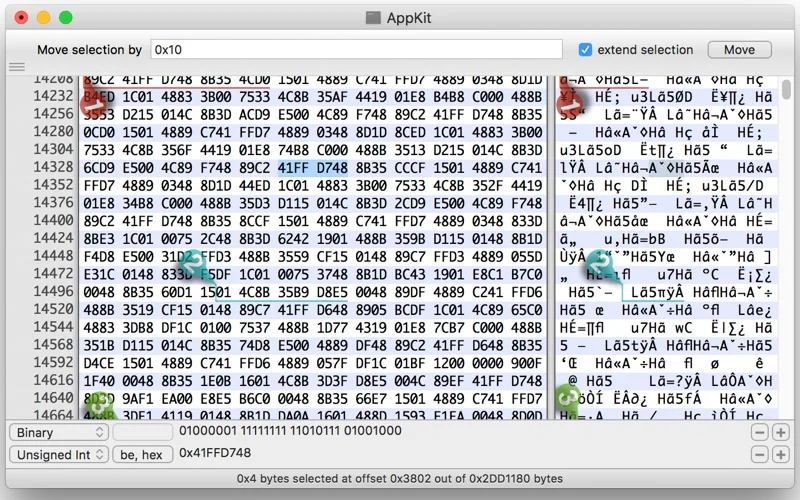
What you can do
- Insert, delete or rearrange bytes rather than only overwriting in place.
- Search and compare binary files while accounting for insertions or deletions.
- Use the publisher-described low-memory approach for large files and incremental saving.
Good for
- Developers inspecting binary formats or comparing controlled copies of files.
Consider alternatives for
- An automatic file-repair tool or a guarantee that editing a live original is safe.
Limitations & considerations
- Byte edits can irreversibly damage a file format. Work on a copy and verify output; large-file limits, speed and the no-temporary-space claim were not independently tested.
Privacy & permissions
Binary files can include credentials or personal data. Use authorized copies and review the store disclosure before assuming all file handling is local; avoid editing files another application is actively writing.
Sources & review notes Updated Nov 17, 2026
Reviewed by iApp4Me Editorial Team. Recommendations use the linked documentation and attributed accounts; device observations are identified separately.
- US App Store listing
Publisher description and US download price captured 2026-11-02; source-based coverage, not a device test.
No comments yet. Be the first to share your experience.