Loud Typer
Add typewriter and other sound effects to Mac keyboard presses from a menu-bar utility.
Someone who enjoys audible typing feedback and application-specific sound themes.
Add typewriter and other sound effects to Mac keyboard presses from a menu-bar utility.
Keep in mind: The publisher notes possible delays with Bluetooth/USB speakers and suggests internal speakers or wired headphones. Permission needs, key handling and latency were not independently tested.
Inside the app
Official product images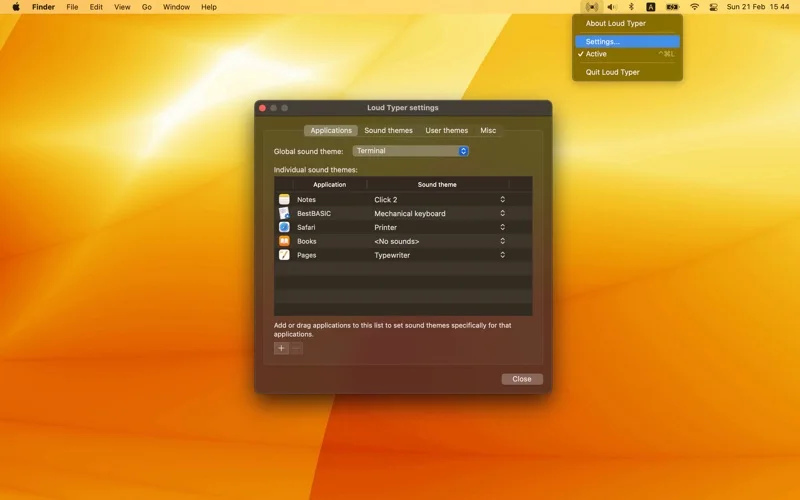
What you can do
- Choose built-in sound sets or create custom themes.
- Assign different sound behavior to individual apps.
- Open settings through the menu-bar icon.
Good for
- Someone who enjoys audible typing feedback and application-specific sound themes.
Consider alternatives for
- An accessibility guarantee or zero-latency output through every speaker.
Limitations & considerations
- The publisher notes possible delays with Bluetooth/USB speakers and suggests internal speakers or wired headphones. Permission needs, key handling and latency were not independently tested.
Privacy & permissions
A keyboard-reactive utility deserves a check of input/accessibility permissions. Review the store disclosure before enabling it while typing sensitive text; key-content logging or its absence is not established.
Sources & review notes Updated Nov 18, 2026
Reviewed by iApp4Me Editorial Team. Recommendations use the linked documentation and attributed accounts; device observations are identified separately.
- US App Store listing
Publisher description, version and US download price captured 2026-11-02; source-based coverage, not a device test.
No comments yet. Be the first to share your experience.