
MarkDownload
Clip a web page or selection into editable Markdown and download the result as an MD file.
Someone archiving readable web material into a Markdown workflow.
Clip a web page or selection into editable Markdown and download the result as an MD file.
Keep in mind: The publisher explicitly does not guarantee all websites work. Check formatting, images and source attribution; clipping does not override content access or copyright.
Inside the app
Official product images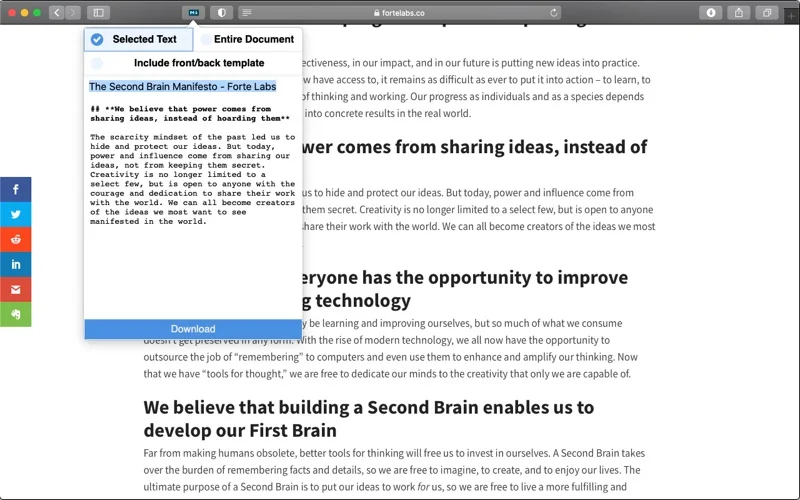
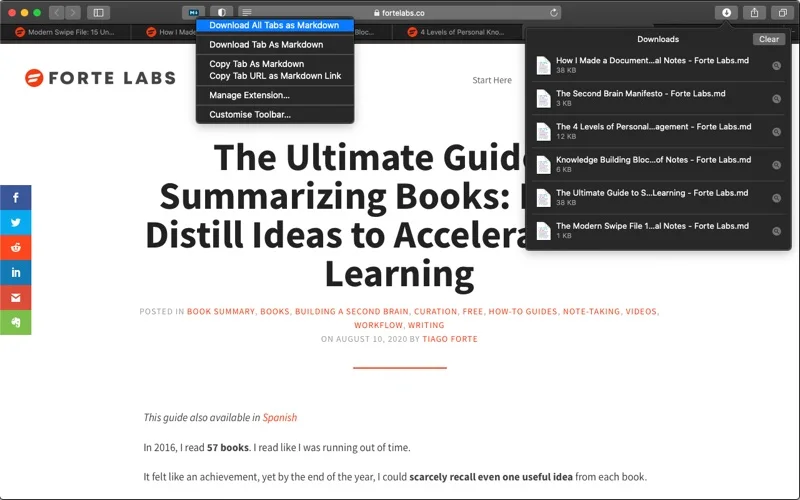
What you can do
- Preview and edit the generated Markdown in the extension popup.
- Save selections or use context menus for page/image/link snippets.
- Download all tabs in a window through the described batch option.
Good for
- Someone archiving readable web material into a Markdown workflow.
Consider alternatives for
- Perfect extraction from every website or a license to redistribute its content.
Limitations & considerations
- The publisher explicitly does not guarantee all websites work. Check formatting, images and source attribution; clipping does not override content access or copyright.
Privacy & permissions
The extension requests site access for all-tab clipping, plus settings and clipboard access. The publisher says no other data is sent online; inspect permissions before using private authenticated pages.
Sources & review notes Updated Nov 18, 2026
Reviewed by iApp4Me Editorial Team. Recommendations use the linked documentation and attributed accounts; device observations are identified separately.
- US App Store listing
Publisher description, version and US download price captured 2026-11-02; source-based coverage, not a device test.
No comments yet. Be the first to share your experience.