OrigNotes
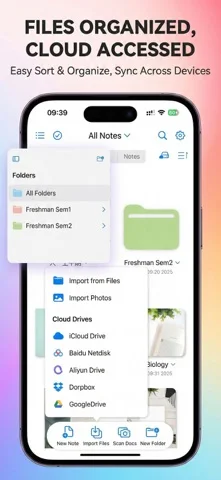
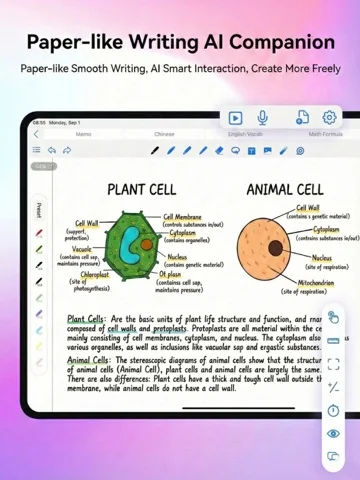
OrigNotes combines handwritten notebooks, PDF annotation and mind maps on iPad and iPhone.
Consider for mixed study notebooks
Handwriting search and multimedia notes connect writing with reference documents.
Keep in mind: Backup restoration and handwriting conversion accuracy were not tested.
Inside the app
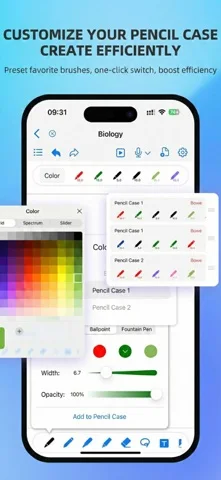
Official product images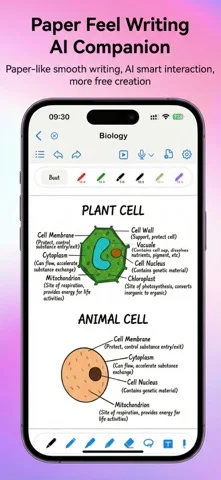
What you can do
- Write with Apple Pencil
- Annotate imported PDFs
- Create mind maps and search handwriting
App Store review themes
Recurring praise and complaints, grouped by topic.
31 reviews · US App Store · Written feedback; review platforms are not identified
What reviewers like
Useful free access
10 reviewsReviewers praise free access and limits.
See 2 review examples
The reviewer appreciates the free access they experience; future pricing is not established.
Original excerpt“Completely free”Apple source · Review 14740900459
The reviewer values the functionality available free.
Original excerpt“so much more than i can usually get for free”Apple source · Review 14556961585
Ease of use
5 reviewsReviewers praise ease of use.
See 2 review examples
The reviewer finds the app easy to use.
Original excerpt“super easy to use”Apple source · Review 14546776923
The reviewer finds the app simple to use.
Original excerpt“So simple, useful, and handy”Apple source · Review 14251903827
Reading and annotation tools
3 reviewsReviewers praise reading and annotation.
See 2 review examples
The reviewer values the available writing tools.
Original excerpt“amount of options for writing utensils”Apple source · Review 14605254113
The reviewer values writing directly on textbooks and assignments.
Original excerpt“write on my textbook and assignments”Apple source · Review 14546776923
What reviewers dislike
Customization limits and requests
3 reviewsReviewers raise concerns or requests about customization.
See 2 review examples
The reviewer requests a serif-font option for converted handwriting.
Original excerpt“auto font from recognized strokewriting have a serif option”Apple source · Review 14557376279
The reviewer requests more writing-tool colors.
Original excerpt“adding more color options for the writing tools”Apple source · Review 13634727742
Integration problems and requests
3 reviewsReviewers raise concerns or requests about integrations.
See 2 review examples
The reviewer requests stylus squeeze-gesture support; no specific stylus model is inferred.
Original excerpt“compatible with the squeeze gesture”Apple source · Review 14381650207
The reviewer reports repeated stylus disconnections in this older version.
Original excerpt“keeps disconnecting pencil”Apple source · Review 13697618328
Workflow and interface friction
3 reviewsReviewers raise concerns or requests about ease of use.
See 2 review examples
The reviewer finds pasting copied diagrams difficult because it requires precise double-tap timing.
Original excerpt“really finicky to then paste it”Apple source · Review 14716236906
The reviewer finds dragging inconvenient and requests a hand-tool control.
Original excerpt“拖动不方便”Apple source · Review 13838954231
Good for
- Students mixing handwriting and PDFs
Consider alternatives for
- Users requiring verified team document workflows
Limitations & considerations
- Captured minimum: iOS 15.0.
- Backup restoration and handwriting conversion accuracy were not tested.
Privacy & permissions
Notes and recordings may contain sensitive material; check the selected cloud backup destination.
Sources & review notes Updated Nov 9, 2026
Reviewed by iApp4Me Editorial Team. Recommendations use the linked documentation and attributed accounts; device observations are identified separately.
- US App Store developer description
Complete description, download price and compatibility metadata captured 2026-11-02.
No comments yet. Be the first to share your experience.