PDF Gear - PDF Editor & Reader
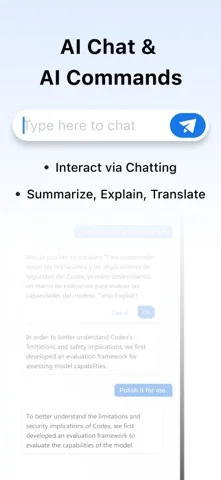
PDFgear for iOS reads, annotates, organizes and fills/signs PDFs.
For basic PDF workflows without listed limits
Local/iCloud file operations support ordinary document handling.
Keep in mind: The listed form workflow inserts text/symbols; it does not establish form-authoring or guaranteed existing-text editing.
Inside the app
Official product images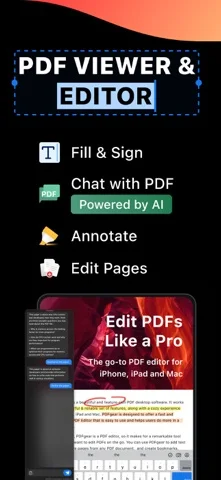
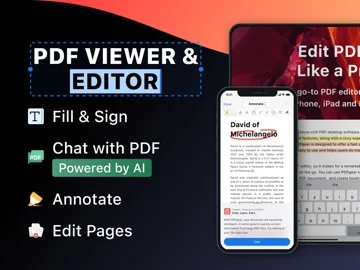
What you can do
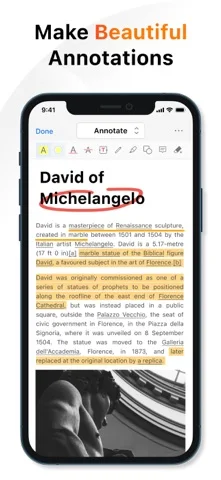
- Annotate with text, shapes and ink.
- Add/extract/rotate pages.
- Fill forms, create signatures and manage files.
App Store review themes
Recurring praise and complaints, grouped by topic.
72 reviews · US App Store · Written feedback; review platforms are not identified
What reviewers like
Useful free access
15 reviewsPositive feedback covers free access to tools (14 reviews); free PDF reading (1 review).
See 2 review examples
Appreciates what they describe as free access to all functions.
Original excerpt“actually is free for all functions”Apple source · Review 14574735326
Values being able to use tools without paying.
Original excerpt“You can do things for free that you can’t do on other apps”Apple source · Review 14534864564
Ease of use
14 reviewsPositive feedback covers easy interface (13 reviews); comfortable to use (1 review).
See 2 review examples
Finds the app fairly easy after initial confusion about where edits are saved.
Original excerpt“Pretty easy to use”Apple source · Review 14395327052
Editing tools reviewers value
7 reviewsPositive feedback covers document editing (6 reviews); editing existing content (1 review).
See 2 review examples
The Spanish-language reviewer finds it good for editing.
Original excerpt“Buena para editar”Apple source · Review 14162271036
Values editing and viewing PDFs while away from a desk.
Original excerpt“PDF editing, viewing and on the go use”Apple source · Review 13868035574
Show fewer positive themes
Value and purchase options
7 reviewsPositive feedback covers avoiding recurring subscriptions (5 reviews); affordable document editing (1 review); no payment-card prompts (1 review).
See 2 review examples
Describes the editor as affordable; future access concerns are hopes rather than a reported loss.
Original excerpt“Affordable Document Editor”Apple source · Review 14619522833
Values an alternative to paid subscriptions.
Original excerpt“a life saver if you do not want to get into paid subscriptions.”Apple source · Review 14098727827
A useful range of tools
6 reviewsPositive feedback covers useful PDF functions (5 reviews); editing functions (1 review).
See 2 review examples
Likes the range of editing functions.
Original excerpt“Lot of different editing functionalities too!”Apple source · Review 14654146193
Finds the toolset sufficient for their PDF needs.
Original excerpt“It does everything I need and more.”Apple source · Review 14327545288
An unobtrusive experience
3 reviewsReviewers praise no ads in their experience.
See 2 review examples
Reports an ad-free experience.
Original excerpt“without any ads too”Apple source · Review 14395327052
Organizing and finding files
3 reviewsPositive feedback covers document management (1 review); editing original files (1 review); reducing paper clutter (1 review).
See 2 review examples
Accepts the direct-overwrite workflow after understanding that it changes the original file.
Original excerpt“if you upload from Files it saves over the original file - which was fine for me”Apple source · Review 14395327052
Values keeping documents accessible while reducing paper clutter.
Original excerpt“reduce paper clutter while keeping your information at hand.”Apple source · Review 14187444292
Speed and responsiveness
3 reviewsPositive feedback covers fast use (2 reviews); large PDF responsiveness (1 review).
See 2 review examples
Finds a large textbook responsive compared with their previous reader.
Original excerpt“pdf gear has not buffered at all”Apple source · Review 14654146193
What reviewers dislike
Crashes, freezes and reliability problems
11 reviewsConcerns and requests cover freezing while editing (5 reviews); occasional crashes (3 reviews); freezing while saving (1 review). Other aspects appear in this group too; these counts describe subtopics, not one shared experience.
See 2 review examples
Reports repeated freezing followed by the app closing while editing.
Original excerpt“it always freezes and abruptly closes soon after.”Apple source · Review 14707919628
Reports locking up after minor editing actions.
Original excerpt“Locks up in Edit mode after minor edits like highlighting.”Apple source · Review 14535736150
Workflow and interface friction
10 reviewsConcerns and requests cover losing reading position (2 reviews); unintuitive interface (2 reviews); crop preview obstructed (1 review). Other aspects appear in this group too; these counts describe subtopics, not one shared experience.
See 2 review examples
Cannot find or understand how to access editing.
Original excerpt“Where is this edit at all?”Apple source · Review 14576765056
Wants the app to restore the editing position and make it easier to leave edit mode.
Original excerpt“Does not return to last point of edit, upon reopening.”Apple source · Review 14535736150
Editing limitations and requests
8 reviewsConcerns and requests cover copy and paste (1 review); direct manipulation controls (1 review); editing existing content (1 review). Other aspects appear in this group too; these counts describe subtopics, not one shared experience.
See 2 review examples
Reports being unable to edit after an update on multiple devices.
Original excerpt“no longer allows edits, tried on multiple devices.”Apple source · Review 14670120289
Wants copy-and-paste functionality that they could not use.
Original excerpt“you can’t copy and paste with this app”Apple source · Review 14513366118
Show fewer negative themes
Reports of lost or overwritten work
4 reviewsConcerns and requests cover lost editing changes (3 reviews); annotations not consistently retained (1 review).
See 2 review examples
Reports losing their changes when the app failed.
Original excerpt“I lost all my changes.”Apple source · Review 14412989661
Reports that highlights are not consistently saved.
Original excerpt“being able to highlight text and have it saved…but only when app feels like it.”Apple source · Review 13915863886
Output quality problems
3 reviewsReviewers raise concerns or requests about formatting disrupted by text edits.
See 2 review examples
Reports broken layout, unreadable URLs and other visual changes when increasing text size.
Original excerpt“it completely unformats the PDF.”Apple source · Review 14047302645
The reviewer reports unpredictable text wrapping when editing in their December 2025 experience.
Original excerpt“Text wrapping has a mind of its own.”Apple source · Review 13513882487
Good for
- People comparing free PDF tools.
Consider alternatives for
- Anyone requiring verified advanced OCR or form creation.
Limitations & considerations
- Captured minimum: iOS 15.0.
- The listed form workflow inserts text/symbols; it does not establish form-authoring or guaranteed existing-text editing.
Privacy & permissions
Signatures/documents and optional iCloud sharing are sensitive.
Sources & review notes Updated Nov 9, 2026
Reviewed by iApp4Me Editorial Team. Recommendations use the linked documentation and attributed accounts; device observations are identified separately.
- US App Store developer description
Complete description, download price and compatibility metadata captured 2026-11-02.
No comments yet. Be the first to share your experience.