Photo & Video
Procreate Dreams
Procreate Dreams combines hand-drawn animation, compositing, and video or audio layers on iPad.
Consider it if you want to draw frames and then animate or composite them in one timeline.
Onion skins, brush imports, and keyframe easing support distinct animation workflows in one project.
Keep in mind: Check device limits for large drawings and exported video formats; available resolution depends on the project and hardware.
Inside the app
Official product images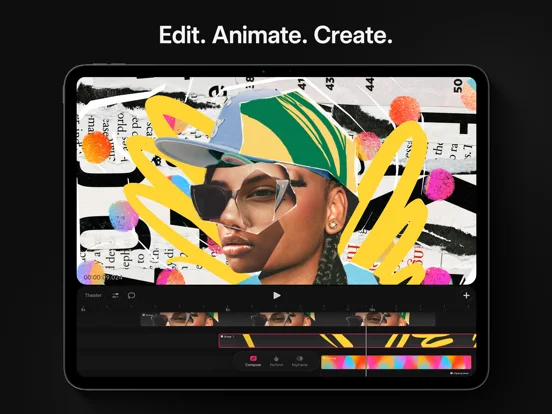
What you can do
- Draw frames using Procreate brushes
- Animate transforms and effects with keyframes
- Export video, transparent frames, or a project file
Good for
- iPad artists making layered 2D animation
Consider alternatives for
- Anyone who primarily needs 3D rigging or desktop project formats
Limitations & considerations
- Captured minimum: iOS 16.3.
- Check device limits for large drawings and exported video formats; available resolution depends on the project and hardware.
Privacy & permissions
Imported video and voice recordings become project content; check exports before sharing a project.
Sources & review notes Updated Nov 11, 2026
Reviewed by iApp4Me Editorial Team. Recommendations use the linked documentation and attributed accounts; device observations are identified separately.
- US App Store developer description
Complete description, download price and compatibility metadata captured 2026-11-02.
No comments yet. Be the first to share your experience.