
SmartAutoFill
Draft values into supported browser form fields using saved context, then review and submit manually; choose hosted credits or a custom AI provider.
Drafting repeated ordinary forms in a desktop browser
Consider SmartAutoFill for repetitive forms in desktop Chrome or Edge when saved browser autofill is too literal. It drafts into the page rather than submitting for you. Check the field matrix and data destination before using hosted AI or attaching materials.
Keep in mind: No extension installation, site compatibility or autofill-accuracy test was performed.
Inside the app
Official product images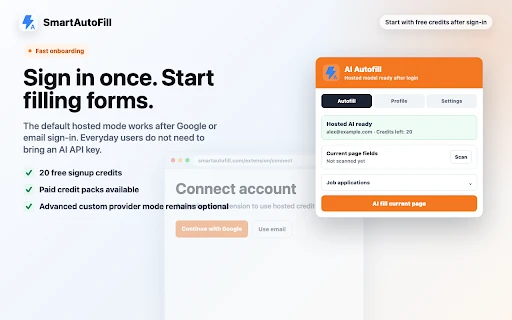
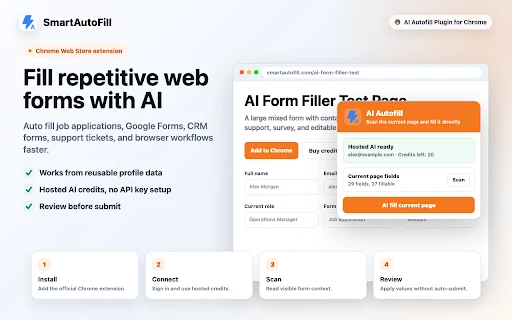
What you can do
- Scan supported visible fields and combine them with saved profile/context data
- Draft values into ordinary text fields and matching native selects
- Review and edit values on the page before manually submitting
- Choose hosted credits or a custom provider for standard text workflows
Good for
- Drafting repeated ordinary forms in a desktop browser
- Users who can review field values and understand where their context is sent
Consider alternatives for
- Automatic form submission or reliable support for every custom widget
- iPhone/Safari installation, passwords, captchas or sensitive identity forms
Desktop browser requirements
The publisher supports Chrome and Microsoft Edge through a browser extension. Version 1.0.33 is listed in the Chrome Web Store. A numeric minimum browser or operating-system version was not established; this is not an iPhone or native Mac App Store app.
Review on the page, then submit yourself
The extension applies draft values to supported fields before you inspect them. It does not provide a separate approval screen before those values appear and does not click the final submit button. Check the original field labels and the provider receiving the context.
Limitations & considerations
- No extension installation, site compatibility or autofill-accuracy test was performed.
- The official matrix excludes iframes and filling radio/checkbox state; custom dropdowns are not reliable. Store language about detection does not mean every control can be filled.
- The Chrome Web Store says no data is collected, while official documentation describes hosted request processing, logs and local storage. We do not treat the store declaration as a zero-processing guarantee.
Privacy & permissions
Hosted mode sends selected profile/context and form/page information to the SmartAutoFill backend and AI infrastructure. Custom-provider mode sends model requests to the provider you choose instead.
The detailed guide says Chrome local storage can retain profiles, API keys, tokens, last-run values and a matched file copy, without a claimed at-rest encryption layer. Local browser storage is separate from hosted log summaries.
Privacy policySources & review notes Updated Nov 8, 2026
Reviewed by iApp4Me Editorial Team. Recommendations use the linked documentation and attributed accounts; device observations are identified separately.
- Chrome Web Store listing
Version 1.0.33 and publisher disclosures checked November 8, 2026.
- Supported fields and data handling
Publisher’s supported-control matrix, hosted/custom-provider paths and local storage details.
- Hosted credit pricing
Current credits, per-fill cost, pack prices and validity.
- Privacy policy
Service-level account, request and retention disclosures; not an independent audit.
No comments yet. Be the first to share your experience.