
Switch for Bose SoundTouch
Control supported Bose SoundTouch speakers and stream selected Mac audio to them.
A SoundTouch owner checking an appropriate Mac controller for their existing speakers.
Control supported Bose SoundTouch speakers and stream selected Mac audio to them.
Keep in mind: The publisher explicitly requires SoundTouch hardware and an extra sound extension for system audio. Several seconds of delay are possible; current model/firmware and extension compatibility were not tested.
Inside the app
Official product images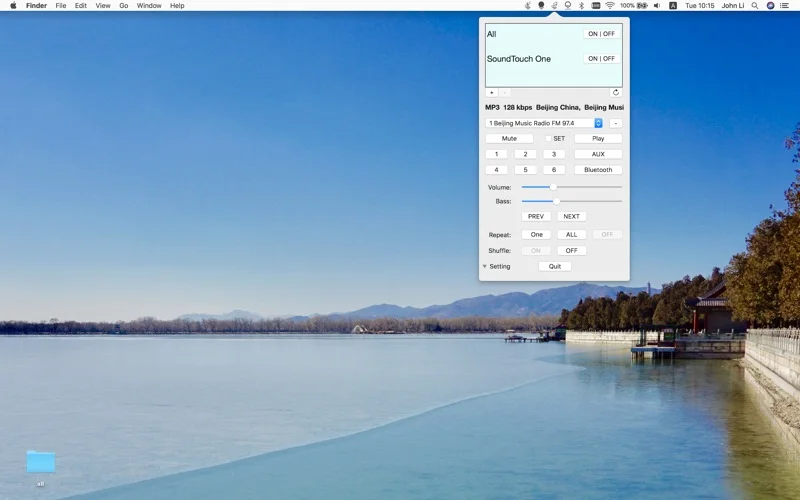
What you can do
- Control power, volume and presets and revisit source history.
- Drag local music files or submit a URL for speaker playback.
- Stream a microphone or system-audio input with the required routing setup.
Good for
- A SoundTouch owner checking an appropriate Mac controller for their existing speakers.
Consider alternatives for
- Every Bose speaker, low-latency audio or system-audio capture without an extra extension.
Limitations & considerations
- The publisher explicitly requires SoundTouch hardware and an extra sound extension for system audio. Several seconds of delay are possible; current model/firmware and extension compatibility were not tested.
Privacy & permissions
Microphone and system-audio routing can transmit private conversations or notification sounds to a speaker. Grant only needed audio permissions and verify the destination before streaming.
Sources & review notes Updated Nov 17, 2026
Reviewed by iApp4Me Editorial Team. Recommendations use the linked documentation and attributed accounts; device observations are identified separately.
- US App Store listing
Publisher description and US download price captured 2026-11-02; source-based coverage, not a device test.
No comments yet. Be the first to share your experience.