
WinShortcutter
WinShortcutter's Safari extension redirects webpage file links to a compatible WinShortcutter installation so a Mac can open Windows-style shared-file shortcuts.
Pick for a Windows-oriented office that already uses WinShortcutter.
The protocol handoff makes existing intranet file links easier to reach from Safari.
Keep in mind: The extension requires WinShortcutter 5.0 or later. It does not supply a Windows environment, network-share permission or an unlimited free licence for the separate host utility.
Inside the app
Official product images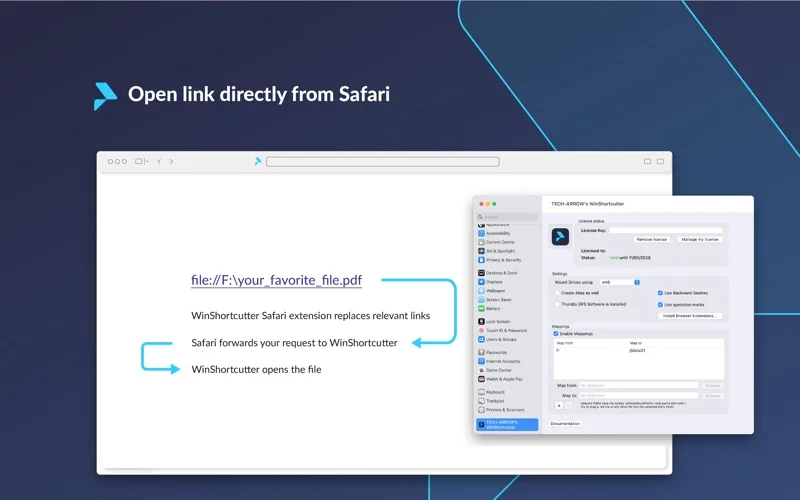
What you can do
- Rewrite file-protocol links for WinShortcutter
- Hand selected links to the installed Mac utility
- Support a workflow using Windows shortcuts and shared paths
Good for
- Mac users opening authorized files from a Windows-based intranet.
Consider alternatives for
- People expecting this free extension alone to install or license the full shortcut-opening product.
Limitations & considerations
- Captured minimum: macOS 10.14.
- The extension requires WinShortcutter 5.0 or later. It does not supply a Windows environment, network-share permission or an unlimited free licence for the separate host utility.
Privacy & permissions
The extension inspects or rewrites relevant website links and opens local or shared paths. Limit its website access and only follow links from trusted sources.
Sources & review notes Updated Nov 15, 2026
Reviewed by iApp4Me Editorial Team. Recommendations use the linked documentation and attributed accounts; device observations are identified separately.
- US App Store developer description
Complete description, release notes, download price and compatibility metadata captured 2026-11-02.
- Official developer disclosure
Full app-specific or successor-service cached text reviewed; captured 2026-11-12. Store/platform and historical-edition distinctions retained above.
No comments yet. Be the first to share your experience.