
xLights
xLights sequences lighting effects to music using a display prepared in the desktop application and compatible external light controllers.
Pick for continuing an existing xLights display workflow on a supported mobile device.
Effects, timing and controller output connect music sequencing to a real light display.
Keep in mind: The display must first be configured with desktop xLights. This captured software listing requires iOS 26; the desktop website's platform list does not change that requirement.
Inside the app
Official product images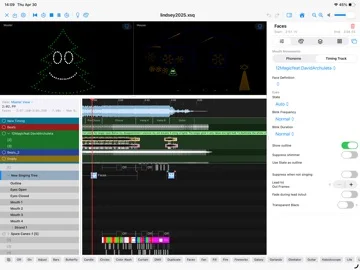
What you can do
- Load music and map effects to models
- Use timing cues and imported sequence material
- Output to supported E1.31, ArtNet, DDP, DMX or other controllers
Good for
- Lighting hobbyists with an existing xLights setup and compatible controllers.
Consider alternatives for
- People expecting the app download to include lights, controllers or a finished display design.
Limitations & considerations
- Captured minimum: iOS 26.0.
- The display must first be configured with desktop xLights. This captured software listing requires iOS 26; the desktop website's platform list does not change that requirement.
Privacy & permissions
Show folders contain music, models and controller addresses. Network output reaches configured controllers; share show packages only with intended recipients.
Sources & review notes Updated Nov 15, 2026
Reviewed by iApp4Me Editorial Team. Recommendations use the linked documentation and attributed accounts; device observations are identified separately.
- US App Store developer description
Complete description, release notes, download price and compatibility metadata captured 2026-11-02.
- Official developer disclosure
Full cached official text reviewed; captured 2026-11-12. Distinct editions, hardware and licence limits retained above.
No comments yet. Be the first to share your experience.