Review Emotions in a Searchable Journal
Use your entries to inspect a pattern rather than treat a chart as an explanation.
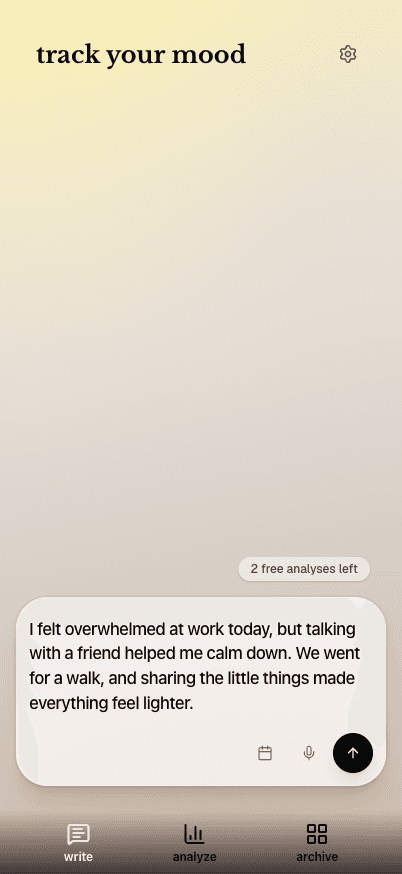
The short answer
Psycled offers writing, context tags, archive filters and optional AI feedback. Begin with your own description, then revisit the entries behind a repeated emotion or word.
Write before interpreting
Record the event and your own words for how it felt. Use generated feedback as a suggestion to examine, leaving aside interpretations that do not fit.
Open the entries behind a pattern
Use filters and dates to inspect the original context. Read account, cloud-processing and purchase terms before entering sensitive information. This is reflection, not clinical assessment.
Limitations & considerations
- AI can misunderstand an entry or infer an emotion that does not fit; patterns in a journal do not establish a cause or diagnosis.
- Free-analysis numbers visible in screenshots are example remaining balances, not a verified universal allowance. Current paid amounts and feature limits are unknown.
Use the linked official pages for current platform, access and purchase conditions.
Sources & scope
Reviewed November 3, 2026. Source-based workflow overview. Official product, store and policy information reviewed November 3, 2026; limits and version differences are detailed in the app guide.
- Psycled · official product overview
Writing, emotion/context views, word cloud, archive and provider-described AI limitations.
- Psycled · US App Store
Current identity, version, languages and free-download scope; checked November 3, 2026.
- Psycled · privacy
Account, sensitive content, cloud storage, requested AI analysis and transcription.
- Psycled · terms
Minimum age, subscription/cancellation and non-clinical service scope.