Edit spoken-word podcast audio on iPad
Turn recordings into an episode with intelligible cuts, consistent levels and a checked export.
The short answer
Ferrite is a candidate for arranging and polishing spoken audio on iPad. The practical question is whether its recording, editing and export workflow meets your episode brief within the available edition. Transcription tools such as MacWhisper and Buzz solve a different problem; they are not substitutes for an audio timeline.
Is this the right fit?
Ferrite Recording Studio
iPhone · iPadEdit spoken-word audio on iPad
Shortlist it for podcast editing, reusable templates and keyboard-driven cleanup rather than music production.
The tradeoff: The workflow rewards setup and practice. Pro limits and recording hardware should be checked separately.
Free tier · Ferrite 3 Pro $29.99
US App Store · USD · 2026-10-18 · Plan details & source
Explore Ferrite Recording Studio →Editorial selection advice based on the linked product documentation, attributed feedback and any explicitly labeled test results—not a universal winner.
See the apps, not just the feature list
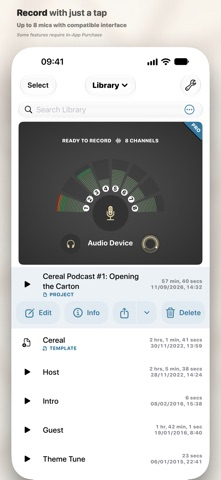
Developer-published product images. Captions identify the platform and source; these are not our test captures.
Ferrite Recording Studio
What reviewers and users say
Our summaries of linked accounts—not our own experience or a vote-based ranking. Older versions and different platforms are labeled. Sources reviewed October 18, 2026.
MacStories · Ryan Christoffel
Historical iPad podcast workflow · not a current UI guide
Christoffel edits Adapt using templates, silence removal and customized keyboard shortcuts. He finds setup valuable but the initial organization less intuitive.
Read in context: He explicitly says he did not try alternative editors. This is detailed workflow evidence, not a comparative award.
How to read disagreement
Different opinions can reflect different jobs, versions, devices or paid plans. We do not call a few comments “the consensus.” A consequential factual conflict that remains after checking those differences is a candidate for a focused hands-on test. A preference for one interface over another usually is not.
Compare your options
| Approach | Intended result | Tradeoff | Evidence boundary |
|---|---|---|---|
| Ferrite on iPad | An arranged spoken-word audio project | Current free/Pro limits and export needs must be checked. | Official overview and detailed feature reference. |
| A simple trim-only recorder workflow | A shortened single recording | Not equivalent to arranging separate speakers, music and segments. | Method boundary, not a tested alternative product recommendation. |
Prepare a small episode brief
Begin with two consented speech clips and, if needed, a music clip you have permission to use. Define the desired opening, one edit, a fade and the required output format. Keep untouched sources so an accidental cut or destructive export does not become the only remaining copy.
For a first test, avoid a long real episode. A short project exposes import, arrangement and export behavior without turning an unfamiliar tool into a deadline risk.
Edit speech without changing its meaning
Remove a false start or long pause, then listen across each cut. A seamless waveform join can still sound unnatural or alter the meaning of an answer. Maintain enough context around quotations, and do not use automatic silence removal as a substitute for listening.
Wooji Juice documents speech-oriented processing and editing tools. Treat those as available methods to evaluate, not proof that the app improves every recording. Noise processing can introduce artifacts; compare before and after at similar playback levels.
Check the file that will actually be published
Listen to the rendered output outside the editor, including the last seconds. Confirm the intended channel layout, title and destination. Keep a project backup separately from the final listening file.
If the free edition interrupts a required operation, record the exact prompt and task rather than describing the entire app as free or paid. We will use the same short project to establish a reproducible edition boundary and retain both the original and exported audio.
Limitations & considerations
- The free edition has limits; Ferrite 3 Pro and the eligible-owner upgrade are different offers.
- Recording hardware and a spoken-word editing workflow are separate choices. Do not assume music-production feature parity.
Documented features, attributed opinions and explicitly labeled hands-on observations are different kinds of evidence. We do not infer unmeasured performance or privacy guarantees.
Sources & scope
Reviewed October 18, 2026. These are provider-published sources; listings and feature access can change. This article uses the linked documentation; any hands-on observations are separately labeled.
- Ferrite detailed features
Developer explains recording, editing, format conversion and restrictions in the free edition.
- Ferrite official support
Documents recording hardware dependencies and free versus Pro channel limits.