Record voice notes on iPhone or iPad
Capture a usable idea first; add a production editor only when the workflow needs it.
The short answer
For a quick spoken note, begin with Apple Voice Memos rather than buying a podcast editor. Investigate Ferrite when you need to turn recordings into an arranged, edited production. Transcription, external microphones and syncing are separate requirements that should not be assumed from the word “recorder.”
Is this the right fit?
Ferrite Recording Studio
iPhone · iPadEdit spoken-word audio on iPad
Shortlist it for podcast editing, reusable templates and keyboard-driven cleanup rather than music production.
The tradeoff: The workflow rewards setup and practice. Pro limits and recording hardware should be checked separately.
Free tier · Ferrite 3 Pro $29.99
US App Store · USD · 2026-10-18 · Plan details & source
Explore Ferrite Recording Studio →Editorial selection advice based on the linked product documentation, attributed feedback and any explicitly labeled test results—not a universal winner.
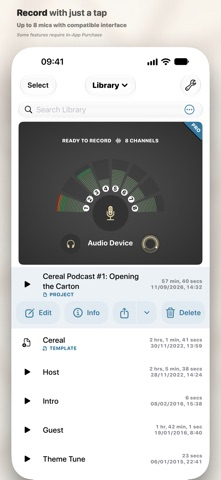
See the apps, not just the feature list
Developer-published product images. Captions identify the platform and source; these are not our test captures.
Ferrite Recording Studio
What reviewers and users say
Our summaries of linked accounts—not our own experience or a vote-based ranking. Older versions and different platforms are labeled. Sources reviewed October 18, 2026.
MacStories · Ryan Christoffel
Historical iPad podcast workflow · not a current UI guide
Christoffel edits Adapt using templates, silence removal and customized keyboard shortcuts. He finds setup valuable but the initial organization less intuitive.
Read in context: He explicitly says he did not try alternative editors. This is detailed workflow evidence, not a comparative award.
How to read disagreement
Different opinions can reflect different jobs, versions, devices or paid plans. We do not call a few comments “the consensus.” A consequential factual conflict that remains after checking those differences is a candidate for a focused hands-on test. A preference for one interface over another usually is not.
Compare your options
| Approach | Intended result | Tradeoff | Evidence boundary |
|---|---|---|---|
| Apple Voice Memos | A baseline for quick recording | Verify sharing, sync and interruption behavior on your system version. | Apple recording guide. |
| Ferrite Recording Studio | Recording with a path into speech editing | Free limits and more production controls may be unnecessary for a short memo. | Wooji Juice overview and support. |
Choose capture or production
A reminder spoken into a phone and a recorded interview have different failure costs. For a note, fast access and finding the recording later may be enough. For an interview, monitoring, permission, backup and a reliable export become much more important.
Apple documents making a recording with Voice Memos. Wooji Juice positions Ferrite around recording and subsequent editing. These are different workflow choices, not a reason to label the simpler app inferior.
Test with your actual surroundings
Make a short sample at the distance you intend to use, then play it back through headphones. A clear room with the phone nearby is not representative of a noisy café or a phone left in a bag. Check for rubbing noise, excessive peaks and speech that becomes too quiet.
If using an external microphone, capture the exact connection and verify that it is the input being recorded. Buying a microphone does not prove the app has selected it. Keep a repeatable test phrase so comparisons are possible.
Make the note retrievable
Give the recording a useful name, confirm the ending was captured and save a copy where you can find it. Decide whether cloud sync is appropriate before recording sensitive material. Do not delete the original solely because an export appears in a share sheet; reopen the saved file first.
Our planned check includes a short interruption and a locked-screen segment. Until that device test is complete, this page makes no promise about behavior during calls or other interruptions.
Limitations & considerations
- The free edition has limits; Ferrite 3 Pro and the eligible-owner upgrade are different offers.
- Recording hardware and a spoken-word editing workflow are separate choices. Do not assume music-production feature parity.
Documented features, attributed opinions and explicitly labeled hands-on observations are different kinds of evidence. We do not infer unmeasured performance or privacy guarantees.
Sources & scope
Reviewed October 18, 2026. These are provider-published sources; listings and feature access can change. This article uses the linked documentation; any hands-on observations are separately labeled.
- Record with Voice Memos
Apple recording instructions. Choose the guide version matching the test device.
- Ferrite Recording Studio overview
Developer positioning: recording and multitrack editing for spoken-word productions.
- Ferrite official support
Documents recording hardware dependencies and free versus Pro channel limits.