PdfCraft
An open-source PDF workbench for reading, merging, splitting and organizing pages, with a native Mac download.
Merge, split and organize pages on desktop
A desktop/self-hosted option for document assembly. Its external tutorial makes the page-management workflow easier to assess before installing.
Before you choose: Do not treat it as an iPhone app or an embedded-image extractor.
Visit the official product page →The essentials
- Platforms
- macOS · Windows · Linux · FreeBSD · Web
- Purchase model
- Free open-source software
- Developer / project
- ArtCraft
- App Store rating
- No dated rating snapshot available; no iApp4Me score assigned.
Price & purchase options
- Open-source desktop / self-hosted project: Free
Hosting and hardware are separate costs. Do not confuse similarly named PDF products.
Official repository · no app fee · checked 2026-10-18 · Verify the current offer ↗. Taxes, promotions and checkout eligibility may change the amount.
Inside the app
Developer-published product images. Captions identify the platform and source; these are not our test captures.
PdfCraft
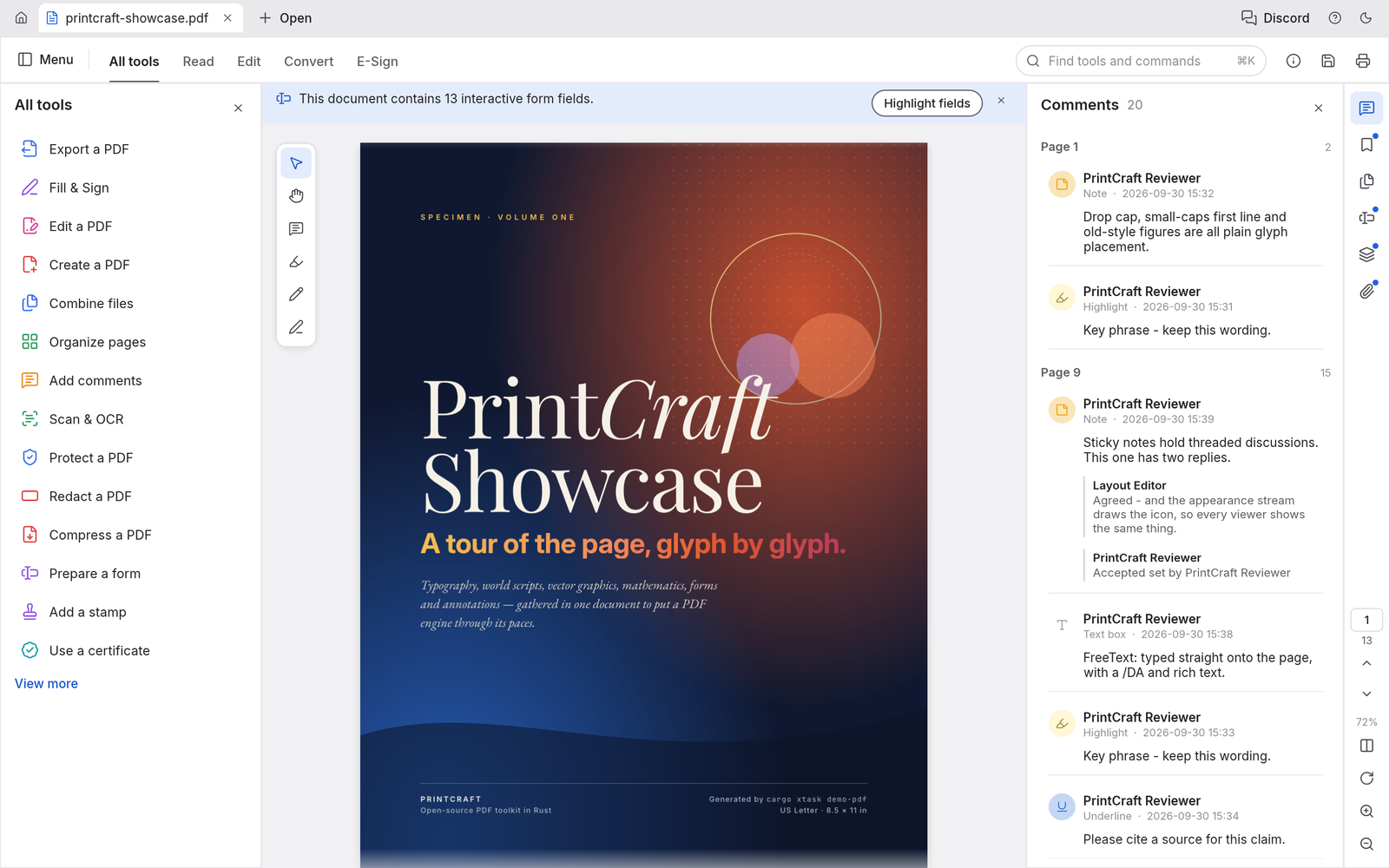
The official repository demo uses PrintCraft branding; it is not our capture of a tested PdfCraft release.
Who it suits
- Researching a free, open-source PDF merger on Mac
- Page organization, splitting and copying selected pages
When to choose something else
- A verified native iPhone or iPad app
- An established embedded-image extraction workflow
- Assuming full Adobe Acrobat feature parity
What reviewers and users say
Our summaries of linked accounts—not our own experience or a vote-based ranking. Older versions and different platforms are labeled. Sources reviewed October 18, 2026.
ByteBriefly
Merge, split and organize PDF tutorial
The tutorial walks through document assembly and page-management operations.
Read in context: An external documentation-based tutorial, not our hands-on evidence or an iPhone workflow.
How to read disagreement
Different opinions can reflect different jobs, versions, devices or paid plans. We do not call a few comments “the consensus.” A consequential factual conflict that remains after checking those differences is a candidate for a focused hands-on test. A preference for one interface over another usually is not.
Features & tradeoffs
Features below come from the linked provider documentation. The recommendations above are our editorial interpretation.
- Provider-documented PDF reading and text search
- Combine PDFs into one document
- Extract selected pages and split documents
- Reorder, rotate, insert and delete pages
Limitations & considerations
- Desktop downloads and the self-hostable web build do not establish a native iPhone/iPad workflow. Its Extract operation means page extraction, not recovery of embedded pictures.
- Preservation of forms, links, layers and bookmarks is a project claim, not a result from our own same-file test.
- No-account and no-telemetry statements are provider claims, not an independent privacy audit.
Documented features, attributed opinions and explicitly labeled hands-on observations are different kinds of evidence. We do not infer unmeasured performance or privacy guarantees.
Privacy & permissions
Check the provider’s policy for the exact feature you intend to use. A store privacy label is developer-reported; it is not an independent network audit. We only call processing offline when the evidence establishes that workflow.
Sources
Product facts checked October 18, 2026. Independent and user perspectives, where available, are attributed above. Missing external coverage is not treated as a negative verdict.
- ArtCraft — official PdfCraft product and downloads
Official page reviewed October 18, 2026; lists version 0.6.0, free desktop downloads and a self-hostable WebAssembly build. Feature, fidelity and no-telemetry statements are provider claims, not our tests.
- PdfCraft official repository
Repository linked by ArtCraft. Documents page organization, combine, page extraction and split. Extract pages is not embedded-image extraction; no iApp4Me output or security test has run.
- ByteBriefly: combine PDFs, extract pages and split a documentExternal tutorial · ByteBriefly · 2026-10-18
External documentation-based tutorial, published October 18, 2026. Credits official screenshots and explicitly disclaims an independent file-fidelity benchmark. Not hands-on validation or a quality verdict.