Organize, split and extract PDF pages
Reorder a document, copy selected pages or split it into smaller PDFs—without confusing pages with embedded pictures.

The short answer
For Mac page work, compare Preview with the open-source PdfCraft workbench. Reorder or rotate when the same document needs a new arrangement; extract selected pages when you need a subset; split when you need several output documents. Use the documented page controls to shortlist a method; document-structure preservation is discussed in the limitations below.
Which app fits your job?
Preview
macOS · iPhone · iPadTry the included Mac tool first
For ordinary viewing, annotation and page operations, start with the tool already on your Mac before installing a larger PDF suite.
The tradeoff: This profile covers Mac Preview, not feature parity with the iPhone edition.
Included with macOS
Apple documentation · included software · 2026-10-18 · Plan details & source
Explore Preview →PdfCraft
macOS · Windows · Linux · FreeBSD · WebMerge, split and organize pages on desktop
A desktop/self-hosted option for document assembly. Its external tutorial makes the page-management workflow easier to assess before installing.
The tradeoff: Do not treat it as an iPhone app or an embedded-image extractor.
Free open-source software
Official repository · no app fee · 2026-10-18 · Plan details & source
Explore PdfCraft →Editorial selection advice based on the linked product documentation, attributed feedback and any explicitly labeled test results—not a universal winner.
See the apps, not just the feature list
Developer-published product images. Captions identify the platform and source; these are not our test captures.
Preview
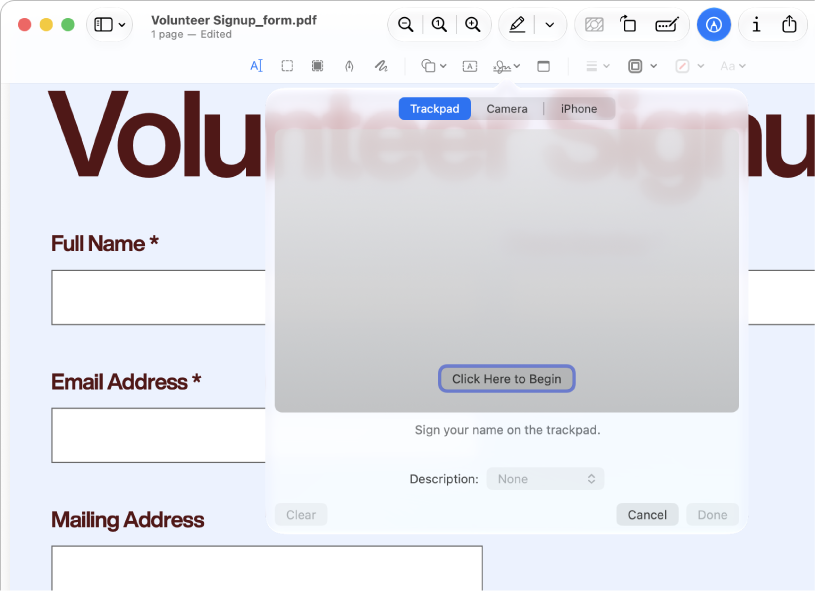
Apple documentation image; interface depends on macOS version.
PdfCraft
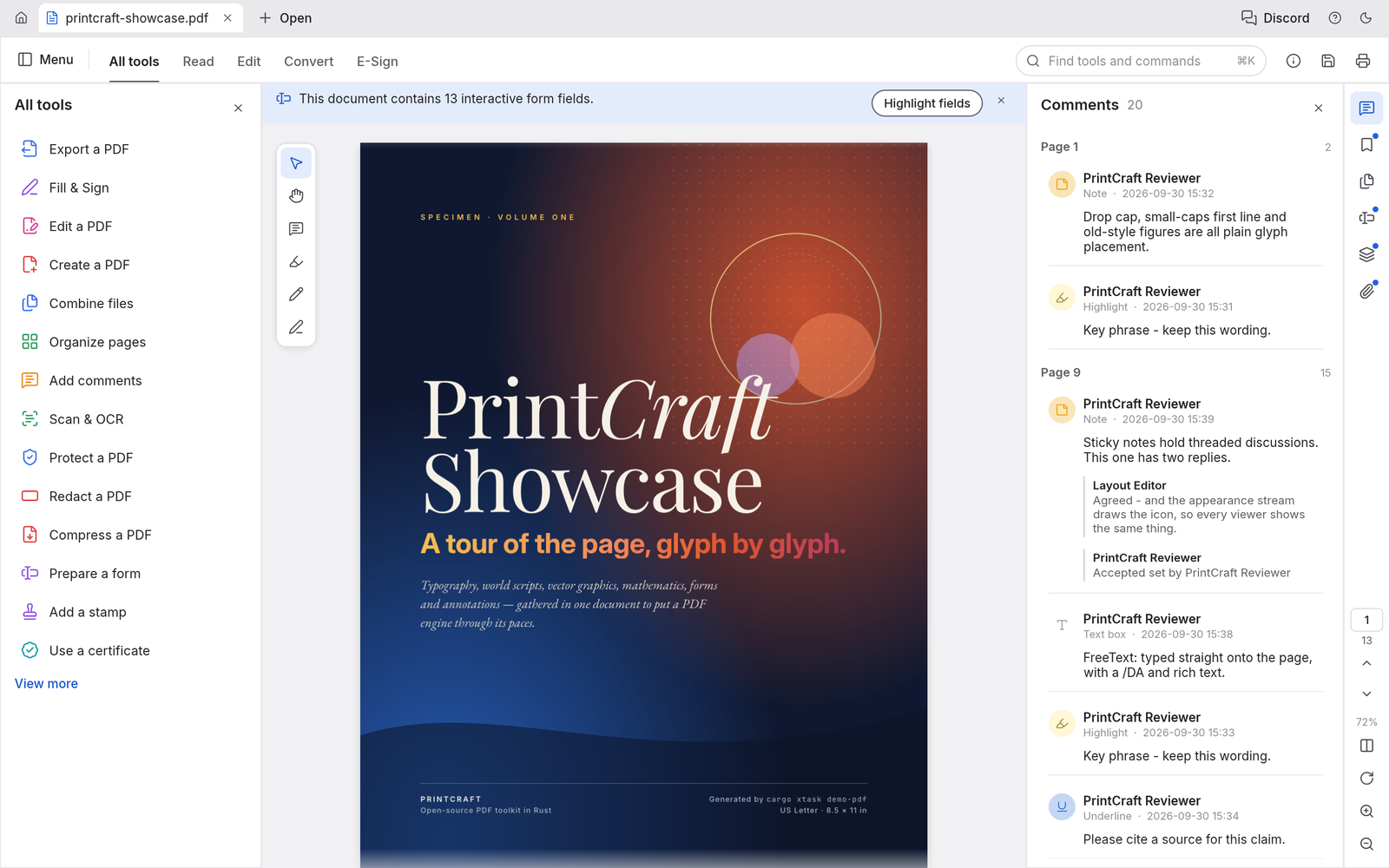
The official repository demo uses PrintCraft branding; it is not our capture of a tested PdfCraft release.
What reviewers and users say
Our summaries of linked accounts—not our own experience or a vote-based ranking. Older versions and different platforms are labeled. Sources reviewed October 18, 2026.
Macworld · Chris Barylick
May 24, 2022 · Preview 11 / macOS Monterey 12.4
Barylick finds the included Preview useful for everyday forms, signatures and basic PDF changes before considering an Acrobat upgrade.
Read in context: A historical Mac comparison. Its old prices and format limitations are not current facts or evidence about iPhone Preview.
ByteBriefly
Merge, split and organize PDF tutorial
The tutorial walks through document assembly and page-management operations.
Read in context: An external documentation-based tutorial, not our hands-on evidence or an iPhone workflow.
How to read disagreement
Different opinions can reflect different jobs, versions, devices or paid plans. We do not call a few comments “the consensus.” A consequential factual conflict that remains after checking those differences is a candidate for a focused hands-on test. A preference for one interface over another usually is not.
Compare your options
| Approach | Intended result | Tradeoff | Evidence boundary |
|---|---|---|---|
| Preview on Mac | Built-in page organization | Check current macOS controls and the exact operation | Apple’s documented Mac workflow |
| PdfCraft on Mac | Organize, combine, extract pages and split | Additional install; current output fidelity untested | ArtCraft documentation and an external documentation-based tutorial |
Choose the intended document result
Write down the physical page positions and output files you expect before changing anything. A cover or Roman-numbered introduction may make printed page labels differ from physical positions. Keep originals and work on copies.
Extracting pages creates a PDF subset. It does not recover the original pictures embedded inside those pages. If you need individual pictures, use the separate PDF image extraction task instead.
Compare a built-in tool and a focused workbench
Apple documents page organization in Preview on Mac. ArtCraft documents Organize pages, Combine files, Extract and Split in PdfCraft. These are documentation-supported candidates; we have not compared selection controls, reliability or output fidelity.
The ByteBriefly tutorial is an external explanation based on official screenshots, not an independent hands-on report. It provides useful checks for page count, order and split boundaries, but does not establish a quality winner.
Verify more than page count
Reopen saved copies in a separate reader. Check the page order, rotation, final section and every join. When links, bookmarks or forms matter, check those explicitly; a correct thumbnail grid does not prove structural preservation.
Record app and operating-system versions and retain failed outputs. ArtCraft’s claims about preserving PDF structures and local handling remain provider claims until the relevant checks are completed. This overview does not establish native iPhone/iPad support or full Acrobat parity.
Limitations & considerations
- Preview: Mac and mobile Preview have different controls and system requirements; the linked Mac instructions do not establish mobile feature parity.
- Preview: Size-reduction filters can degrade images or fine text. Keep the original PDF.
- PdfCraft: Desktop downloads and the self-hostable web build do not establish a native iPhone/iPad workflow. Its Extract operation means page extraction, not recovery of embedded pictures.
- PdfCraft: Preservation of forms, links, layers and bookmarks is a project claim, not a result from our own same-file test.
- PdfCraft: No-account and no-telemetry statements are provider claims, not an independent privacy audit.
Documented features, attributed opinions and explicitly labeled hands-on observations are different kinds of evidence. We do not infer unmeasured performance or privacy guarantees.
Sources & scope
Reviewed October 18, 2026. Sources include official documentation and an external documentation-based tutorial; neither is our own hands-on evidence. This article uses the linked documentation; any hands-on observations are separately labeled.
- Preview user guide for Mac
Mac documentation; do not assume identical iPhone/iPad controls.
- ArtCraft — official PdfCraft product and downloads
Official page reviewed October 18, 2026; lists version 0.6.0, free desktop downloads and a self-hostable WebAssembly build. Feature, fidelity and no-telemetry statements are provider claims, not our tests.
- PdfCraft official repository
Repository linked by ArtCraft. Documents page organization, combine, page extraction and split. Extract pages is not embedded-image extraction; no iApp4Me output or security test has run.
- ByteBriefly: combine PDFs, extract pages and split a document
External documentation-based tutorial, published October 18, 2026. Credits official screenshots and explicitly disclaims an independent file-fidelity benchmark. Not hands-on validation or a quality verdict.