
Buzz
An open-source desktop route to offline speech transcription and timed subtitle files.
An open-source transcription starting point
Consider it when inspectable software and subtitle export matter more than a commercial transcript workspace.
Before you choose: Check supported hardware and model setup in the current project documentation.
Visit the official product page →The essentials
- Platforms
- macOS · Windows · Linux
- Purchase model
- Free open-source software
- Developer / project
- Buzz open-source contributors
- App Store rating
- No dated rating snapshot available; no iApp4Me score assigned.
Price & purchase options
- Desktop application: Free
Model downloads, compatible hardware and any optional external services are separate considerations.
Official repository · no app fee · checked 2026-10-18 · Verify the current offer ↗. Taxes, promotions and checkout eligibility may change the amount.
Inside the app
Developer-published product images. Captions identify the platform and source; these are not our test captures.
Buzz
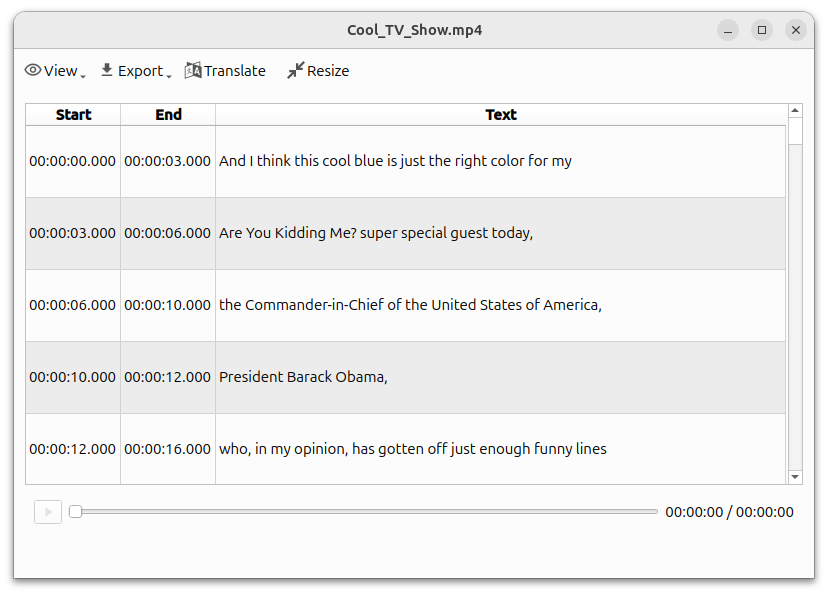
Official repository screenshot with a Linux-style interface; not a Mac screenshot.
Who it suits
- Users comfortable checking model and backend settings
- Cross-platform transcription research
When to choose something else
- Users assuming every current Mac build supports Intel
- Full movie editing
What reviewers and users say
Our summaries of linked accounts—not our own experience or a vote-based ranking. Older versions and different platforms are labeled. Sources reviewed October 18, 2026.
Tom Fichtner
2026 voice-memo transcription article · Windows workflow
Fichtner favors recording a voice memo and then importing the file. He reports missing beginnings or endings with live recording and trouble with recursive folder watching.
Read in context: Not our test and not a Mac result. Check release and recording conditions before treating those reported problems as current universal defects.
How to read disagreement
Different opinions can reflect different jobs, versions, devices or paid plans. We do not call a few comments “the consensus.” A consequential factual conflict that remains after checking those differences is a candidate for a focused hands-on test. A preference for one interface over another usually is not.
Features & tradeoffs
Features below come from the linked provider documentation. The recommendations above are our editorial interpretation.
- Offline audio/video transcription documented
- TXT, SRT and VTT export documented
Limitations & considerations
- Newer Mac builds require Apple Silicon; the project identifies 1.4.5 as the last Intel-compatible release.
- Model/backend choices affect setup and output. The cited live-recording problems are a user’s Windows account, not a reproduced current Mac defect.
Documented features, attributed opinions and explicitly labeled hands-on observations are different kinds of evidence. We do not infer unmeasured performance or privacy guarantees.
Privacy & permissions
Check the provider’s policy for the exact feature you intend to use. A store privacy label is developer-reported; it is not an independent network audit. We only call processing offline when the evidence establishes that workflow.
Sources
Product facts checked October 18, 2026. Independent and user perspectives, where available, are attributed above. Missing external coverage is not treated as a negative verdict.
- Buzz official repository
Project README documents offline transcription, supported exports and current Mac architecture restrictions.