Generate subtitles locally on a Mac
Choose a caption workflow by output format, correction effort and processing location—not a promise of perfect AI accuracy.

The short answer
A local subtitle workflow needs three things: a speech model prepared on the Mac, a way to correct the transcript and timing, and an exported subtitle file that works in the destination player. TinyStudio, MacWhisper and Buzz are candidates; none has won an iApp4Me benchmark yet.
Which app fits your job?
TinyStudio
macOSA focused Mac subtitle workflow
Shortlist it when the deliverable is a subtitle file rather than a multitrack video project. Read the model-setup instructions before getting started.
The tradeoff: The Mac App Store listing is free. The 2023 model-preparation guide can differ from current controls; no accuracy or speed benchmark is implied.
Free Mac download
US App Store · USD · 2026-10-18 · Plan details & source
Explore TinyStudio →MacWhisper
macOSTurn recordings into reusable transcripts
Shortlist it when you need transcript editing and exports as well as captions. Pick a local model when the intended workflow is on-device.
The tradeoff: Model, hardware and optional cloud features change the tradeoff. A single reviewer’s speed result is not a universal benchmark.
Free edition · Pro €64 one-time
Vendor website · EUR · 2026-10-18 · Plan details & source
Explore MacWhisper →Buzz
macOS · Windows · LinuxAn open-source transcription starting point
Consider it when inspectable software and subtitle export matter more than a commercial transcript workspace.
The tradeoff: Check supported hardware and model setup in the current project documentation.
Free open-source software
Official repository · no app fee · 2026-10-18 · Plan details & source
Explore Buzz →Editorial selection advice based on the linked product documentation, attributed feedback and any explicitly labeled test results—not a universal winner.
See the apps, not just the feature list
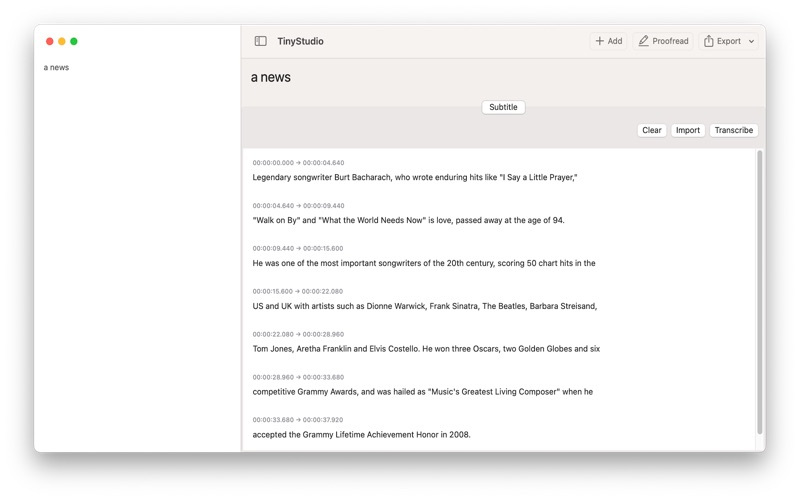
Developer-published product images. Captions identify the platform and source; these are not our test captures.
TinyStudio
MacWhisper
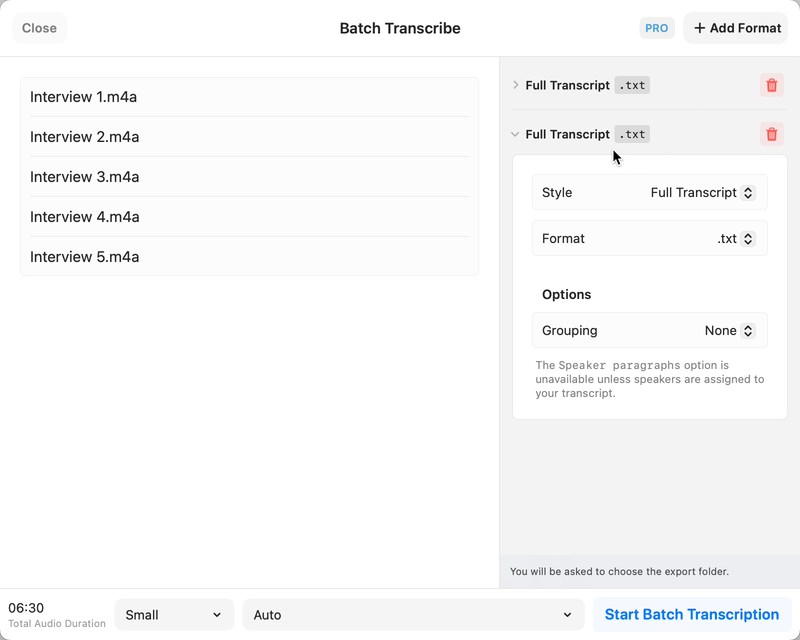
Still from the official batch-transcription demo, not our test capture.
Buzz
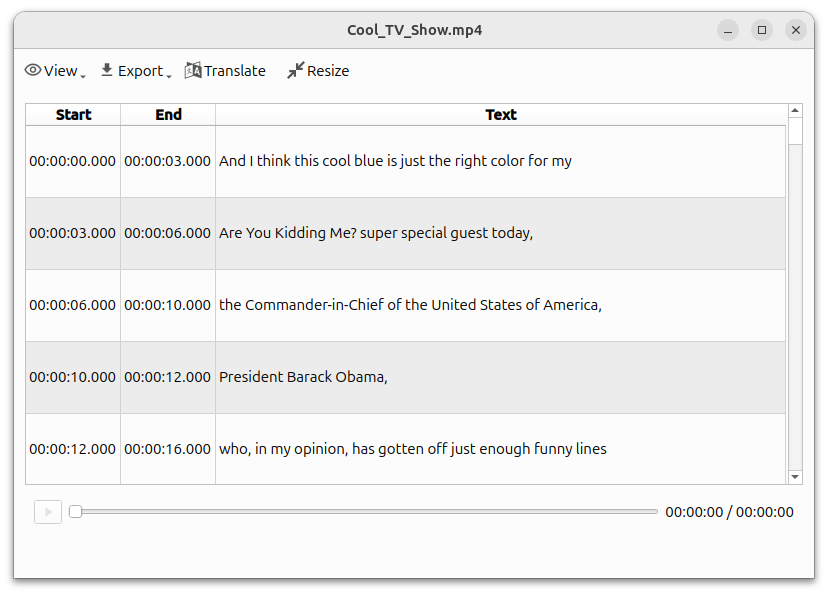
Official repository screenshot with a Linux-style interface; not a Mac screenshot.
What reviewers and users say
Our summaries of linked accounts—not our own experience or a vote-based ranking. Older versions and different platforms are labeled. Sources reviewed October 18, 2026.
9to5Mac · Zac Hall
Dec 6, 2024 · MacWhisper 11 / 11.1
Hall welcomes the transcript-view redesign and sidebar, and covers the menu-bar dictation workflow.
Read in context: An older release article partly reproducing the developer’s announcement—not an independent accuracy or speed benchmark.
r/macapps · CtrlAltDelve
MacWhisper 12.2-era · Parakeet vs Whisper · M1 Max
This user prefers Parakeet for quickly turning long spoken notes into readable text, while acknowledging errors in names.
Read in context: One recording and one machine, not our benchmark. The post updates an initially reported crash as fixed; do not repeat it as an unresolved current bug.
Tom Fichtner
2026 voice-memo transcription article · Windows workflow
Fichtner favors recording a voice memo and then importing the file. He reports missing beginnings or endings with live recording and trouble with recursive folder watching.
Read in context: Not our test and not a Mac result. Check release and recording conditions before treating those reported problems as current universal defects.
TinyStudio · External coverage: Exact-name and developer-name searches reviewed October 18, 2026 mainly surfaced developer material and listing mirrors. No suitable independent evaluation is included yet. Official documentation and the Mac App Store listing support product facts, not a claim of independent endorsement.
How to read disagreement
Different opinions can reflect different jobs, versions, devices or paid plans. We do not call a few comments “the consensus.” A consequential factual conflict that remains after checking those differences is a candidate for a focused hands-on test. A preference for one interface over another usually is not.
Compare your options
| Approach | Intended result | Tradeoff | Evidence boundary |
|---|---|---|---|
| TinyStudio | Focused subtitle candidate | Current interface and export behavior need verification. | Official developer site; not independently timed. |
| MacWhisper | Transcript-oriented candidate with subtitle export | Check edition and avoid optional cloud actions for a local-only brief. | Official feature overview. |
| Buzz | Open-source desktop subtitle candidate | Model/backend setup and Mac architecture matter. | Project README. |
Decide what you need to deliver
A text transcript is not a finished caption file. A timed sidecar such as SRT can accompany a video without changing the original pixels; burned-in captions require a separate rendering step. Specify the destination before selecting an app, including whether the viewer must be able to turn captions off.
For short social clips, readable line breaks may matter more than a large export-format list. For an interview archive, searchable text may matter more than visual styling. Judge the complete workflow against that deliverable rather than counting AI features.
Prepare first, then test offline
An initial download does not contradict local processing: the model and app may need internet access before the first run. Use a non-sensitive sample for setup. Afterwards disconnect networking and repeat import, recognition, correction and export. That demonstrates an offline workflow on that configuration, not an audit proving the app never communicates when online.
Check the result before publishing
Watch the entire exported result, especially names, numbers, silence and the final minute. Listen for words omitted by the model and check that captions do not drift after edits. The useful comparison is time to an acceptable corrected file, not simply time until a progress bar stops. Any comparison will retain competing outputs and explain its evidence.
Limitations & considerations
- TinyStudio: The model-preparation article dates from 2023; its controls may differ from the current release.
- MacWhisper: Local models and optional cloud/API integrations are different processing routes; select the route appropriate for the recording.
- Buzz: Newer Mac builds require Apple Silicon; the project identifies 1.4.5 as the last Intel-compatible release.
Documented features, attributed opinions and explicitly labeled hands-on observations are different kinds of evidence. We do not infer unmeasured performance or privacy guarantees.
Sources & scope
Reviewed October 18, 2026. These are provider-published sources; listings and feature access can change. This article uses the linked documentation; any hands-on observations are separately labeled.
- TinyStudio official site
Developer description of a Whisper-based Mac subtitle app; performance testimonials are not independent evidence.
- MacWhisper official website
Official capabilities and free/Pro overview. Local transcription and optional cloud AI are distinct workflows.
- Buzz official repository
Project README documents offline transcription, supported exports and current Mac architecture restrictions.