Convert audio or video for a specific destination
Choose the required container, codec and quality before choosing an app.


The short answer
First find out what the destination accepts. QuickTime Player provides a built-in Mac export route for some common needs; Ferrite and video editors offer task-specific exports. None should be described as a universal converter, and changing a filename extension does not convert the underlying media.
Which app fits your job?
Ferrite Recording Studio
iPhone · iPadEdit spoken-word audio on iPad
Shortlist it for podcast editing, reusable templates and keyboard-driven cleanup rather than music production.
The tradeoff: The workflow rewards setup and practice. Pro limits and recording hardware should be checked separately.
Free tier · Ferrite 3 Pro $29.99
US App Store · USD · 2026-10-18 · Plan details & source
Explore Ferrite Recording Studio →iMovie
iPhone · iPad · macOSAssemble a straightforward video on Apple devices
Start here for a simple movie project before paying for a more complex timeline editor.
The tradeoff: Exporting a finished video is different from handing over an editable project. Mac and iPad workflows differ.
Free download
US App Store · USD · 2026-10-18 · Plan details & source
Explore iMovie →LumaFusion
iPhone · iPadBuild a more involved mobile video timeline
Consider it when a simple movie editor no longer fits your multitrack editing workflow.
The tradeoff: Older reviews describe older releases. Verify current add-ons, hardware support and project interchange before buying.
$29.99 app · optional paid extras
US App Store · USD · 2026-10-18 · Plan details & source
Explore LumaFusion →Editorial selection advice based on the linked product documentation, attributed feedback and any explicitly labeled test results—not a universal winner.
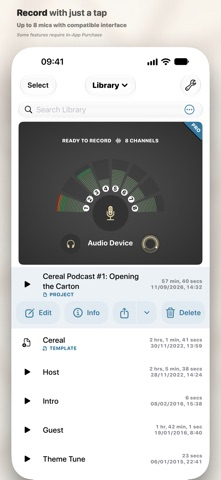
See the apps, not just the feature list
Developer-published product images. Captions identify the platform and source; these are not our test captures.
Ferrite Recording Studio
iMovie
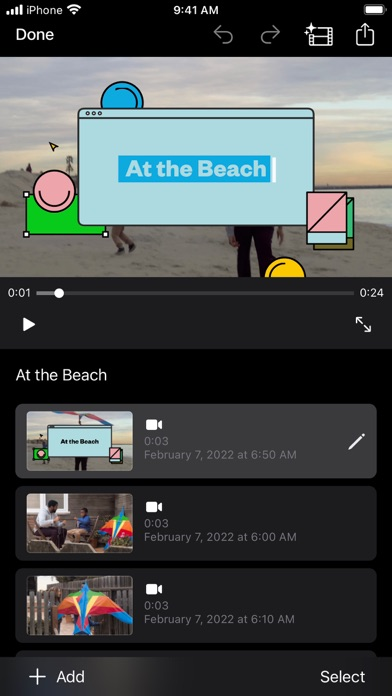
LumaFusion

What reviewers and users say
Our summaries of linked accounts—not our own experience or a vote-based ranking. Older versions and different platforms are labeled. Sources reviewed October 18, 2026.
MacStories · Ryan Christoffel
Historical iPad podcast workflow · not a current UI guide
Christoffel edits Adapt using templates, silence removal and customized keyboard shortcuts. He finds setup valuable but the initial organization less intuitive.
Read in context: He explicitly says he did not try alternative editors. This is detailed workflow evidence, not a comparative award.
TechRadar · Steve Paris
Dec 6, 2023 · iPhone and iPad
Paris finds the Movie, Storyboard and Magic Movie approaches approachable for beginners, but too limited for more involved editing.
Read in context: His device-specific glitch involved iOS 16 and did not reproduce across all tested devices. It is not evidence of a current universal bug or a Mac review.
Macworld
2018 iOS review · historical
The reviewer treats LumaFusion as a route to more serious video editing on iOS than a basic movie app.
Read in context: Useful background on product positioning, not evidence of today’s performance, price or add-ons.
How to read disagreement
Different opinions can reflect different jobs, versions, devices or paid plans. We do not call a few comments “the consensus.” A consequential factual conflict that remains after checking those differences is a candidate for a focused hands-on test. A preference for one interface over another usually is not.
Compare your options
| Approach | Intended result | Tradeoff | Evidence boundary |
|---|---|---|---|
| QuickTime Player on Mac | Supported movie or audio-only exports | Not a general codec conversion toolbox. | Apple export guide. |
| Ferrite | Audio conversion in a speech-editing workflow | Check current import/export and edition restrictions. | Developer detailed feature documentation. |
| iMovie or LumaFusion | Rendered movie from an editing project | Additional editing workflow may be unnecessary for conversion alone. | Official export documentation; exact output needs device validation. |
Name the compatibility problem
A file extension alone is not enough. A recipient may need a particular codec, resolution, audio layout or size limit inside that container. Write down the destination requirement and inspect the source before choosing export settings. If you only need audio, rendering another full-size video may waste both time and storage.
Conversion cannot recover detail already removed by compression. Avoid repeated lossy conversions when an original is available, and keep the original file until the recipient confirms the new one works.
Use a bounded export route
Apple documents QuickTime Player movie exports on Mac, including an audio-only route. That is a sensible first place to investigate for supported files, not a promise of every output format. On iPad, an editor may be appropriate if you are also changing the timeline; importing into a large project solely to change a container may be unnecessary.
Ferrite documents audio-format conversion, but the current edition and export choices need checking. A workflow that succeeds for one sample does not establish compatibility with every codec bearing the same extension.
Verify in the destination
Open the exported file in the actual target app or player. Check sound, duration, orientation and the final frame, not just whether a thumbnail appears. For a size limit, measure the resulting file instead of guessing from a quality label.
Our candidate list here is intentionally limited. If the task requires a format these tools do not expose, we need to research a dedicated converter rather than pretend a transcription app supplies conversion features.
Limitations & considerations
- Ferrite Recording Studio: The free edition has limits; Ferrite 3 Pro and the eligible-owner upgrade are different offers.
- iMovie: Mac and iPhone/iPad interfaces and export capabilities differ. Device requirements matter.
- LumaFusion: The $29.99 base app, Creator Pass and separately listed add-ons are distinct purchases.
Documented features, attributed opinions and explicitly labeled hands-on observations are different kinds of evidence. We do not infer unmeasured performance or privacy guarantees.
Sources & scope
Reviewed October 18, 2026. These are provider-published sources; listings and feature access can change. This article uses the linked documentation; any hands-on observations are separately labeled.
- QuickTime Player export formats
Apple documents built-in Mac export options; this is not a universal media converter.
- Ferrite detailed features
Developer explains recording, editing, format conversion and restrictions in the free edition.
- LumaFusion official reference guide
Official gateway to platform-specific manuals and in-app Help.