LumaFusion
A multitrack editor to investigate when an iPad project needs more deliberate control over layers and sound.
Build a more involved mobile video timeline
Consider it when a simple movie editor no longer fits your multitrack editing workflow.
Keep in mind: Older reviews describe older releases. Verify current add-ons, hardware support and project interchange before buying.
Inside the app
Official product images
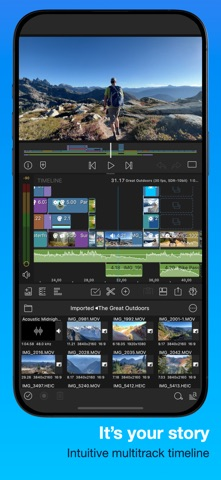
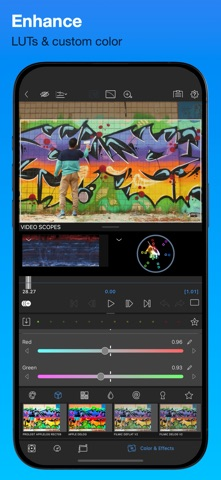
What you can do
- Multitrack timeline described by developer
- Keyframed effects and audio controls
- Project and movie export options
App Store review themes
Recurring praise and complaints, grouped by topic.
116 reviews · US App Store · Written feedback; review platforms are not identified
What reviewers like
Ease of use
9 reviewsThe long-term reviewer finds the clean interface approachable for beginners.
See 2 review examples
The long-term reviewer finds the clean interface approachable for beginners.
Original excerpt“It’s easy to use especially if you’re a beginner to video editing.”Apple source · Review 14596553271
The reviewer finds cutting clips and managing the timeline intuitive.
Original excerpt“The app is so intuitive.”Apple source · Review 14585413815
Price and subscriptions
7 reviewsThe reviewer considers their historical purchase good value; this is not a current price claim.
See 2 review examples
The reviewer considers their historical purchase good value; this is not a current price claim.
Original excerpt“for $20 I feel like it’s a great app.”Apple source · Review 14596553271
The reviewer considers the purchase worthwhile.
Original excerpt“It’s worth the money!”Apple source · Review 14419578956
Speed and responsiveness
7 reviewsThe reviewer values quickly producing content using the mobile editor.
See 2 review examples
The reviewer values quickly producing content using the mobile editor.
Original excerpt“Nothing is faster to be able to do it in the palm of your hands”Apple source · Review 14484689995
The reviewer praises editing speed after moving from a desktop workflow.
Original excerpt“blown me away with its power, speed, and reliability.”Apple source · Review 14376440596
What reviewers dislike
Ease of use
22 reviewsThe reviewer reports an undersized slider area on the editing screen after the latest update on their Pro Max phone.
See 2 review examples
The reviewer reports an undersized slider area on the editing screen after the latest update on their Pro Max phone.
Original excerpt“the sliders area is tiny.”Apple source · Review 14707442727
The reviewer finds simple changes such as speeding up video require too many screens and steps on iPad.
Original excerpt“Users shouldn’t have to go to multiple pages to edit one thing.”Apple source · Review 14659216302
Price and subscriptions
20 reviewsThe reviewer expected video-lightening and cropping tools but believes most desired features require additional payment.
See 2 review examples
The reviewer expected video-lightening and cropping tools but believes most desired features require additional payment.
Original excerpt“I paid $30 and can only zoom in. Everything else is paywalled.”Apple source · Review 14638558485
The reviewer objects to additional subscriptions after buying the base app.
Original excerpt“after the app purchase many features are locked behind a monthly subscription.”Apple source · Review 14628133420
Import and export
8 reviewsThe reviewer says the share option does not work for their intended clips; the precise workflow is unclear.
See 2 review examples
The reviewer says the share option does not work for their intended clips; the precise workflow is unclear.
Original excerpt“the share option doesn't work.”Apple source · Review 14542350122
The reviewer wants SRT subtitle import, which they report is unavailable.
Original excerpt“SRT file import”Apple source · Review 14092041130
Good for
- Editors with a concrete layered-video requirement
- An iPad workflow that has outgrown a simple edit
Consider alternatives for
- Buying features without a project that needs them
- Assuming every advertised capability is included on every device
Limitations & considerations
- The $29.99 base app, Creator Pass and separately listed add-ons are distinct purchases.
- An exported movie does not prove that an editable project contains all linked external media. Keep source files and project backups.
Use it for
Guides & comparisons
Sources & review notes Updated Oct 18, 2026
Reviewed by iApp4Me Editorial Team. Recommendations use the linked documentation and attributed accounts; device observations are identified separately.
- LumaFusion for iOS features
Developer feature reference; purchased edition, add-ons and compatible hardware need separate verification.
- LumaFusion official reference guide
Official gateway to platform-specific manuals and in-app Help.
What reviewers and users say
Our summaries of linked accounts—not our own experience or a vote-based ranking. Older versions and different platforms are labeled. Sources reviewed October 18, 2026.
Macworld
2018 iOS review · historical
The reviewer treats LumaFusion as a route to more serious video editing on iOS than a basic movie app.
Read in context: Useful background on product positioning, not evidence of today’s performance, price or add-ons.
How to read disagreement
Different opinions can reflect different jobs, versions, devices or paid plans. We do not call a few comments “the consensus.” A consequential factual conflict that remains after checking those differences is a candidate for a focused hands-on test. A preference for one interface over another usually is not.
No comments yet. Be the first to share your experience.