Edit a video on iPad
Start with the edit you need: a simple sequence or a layered production.


The short answer
Try iMovie for a straightforward sequence of clips, titles and music. Investigate LumaFusion when you can name a control or workflow that the simple edit lacks. We have not run a head-to-head edit, so this is a decision framework rather than a claim that one app is universally faster or better.
Which app fits your job?
iMovie
iPhone · iPad · macOSAssemble a straightforward video on Apple devices
Start here for a simple movie project before paying for a more complex timeline editor.
The tradeoff: Exporting a finished video is different from handing over an editable project. Mac and iPad workflows differ.
Free download
US App Store · USD · 2026-10-18 · Plan details & source
Explore iMovie →LumaFusion
iPhone · iPadBuild a more involved mobile video timeline
Consider it when a simple movie editor no longer fits your multitrack editing workflow.
The tradeoff: Older reviews describe older releases. Verify current add-ons, hardware support and project interchange before buying.
$29.99 app · optional paid extras
US App Store · USD · 2026-10-18 · Plan details & source
Explore LumaFusion →Editorial selection advice based on the linked product documentation, attributed feedback and any explicitly labeled test results—not a universal winner.
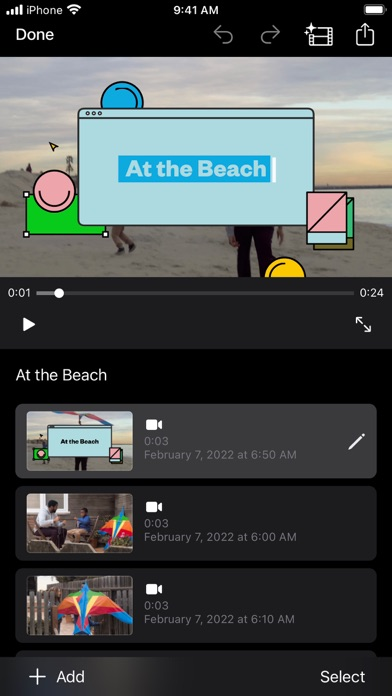
See the apps, not just the feature list
Developer-published product images. Captions identify the platform and source; these are not our test captures.
iMovie
LumaFusion
What reviewers and users say
Our summaries of linked accounts—not our own experience or a vote-based ranking. Older versions and different platforms are labeled. Sources reviewed October 18, 2026.
TechRadar · Steve Paris
Dec 6, 2023 · iPhone and iPad
Paris finds the Movie, Storyboard and Magic Movie approaches approachable for beginners, but too limited for more involved editing.
Read in context: His device-specific glitch involved iOS 16 and did not reproduce across all tested devices. It is not evidence of a current universal bug or a Mac review.
Macworld
2018 iOS review · historical
The reviewer treats LumaFusion as a route to more serious video editing on iOS than a basic movie app.
Read in context: Useful background on product positioning, not evidence of today’s performance, price or add-ons.
How to read disagreement
Different opinions can reflect different jobs, versions, devices or paid plans. We do not call a few comments “the consensus.” A consequential factual conflict that remains after checking those differences is a candidate for a focused hands-on test. A preference for one interface over another usually is not.
Compare your options
| Approach | Intended result | Tradeoff | Evidence boundary |
|---|---|---|---|
| iMovie for iPad | Guided or manual movie assembly | Check whether its available controls meet your actual brief. | Apple user guide. |
| LumaFusion for iPad | A more configurable multitrack editing candidate | More decisions, purchase/add-on boundaries and hardware dependencies. | LumaTouch feature and reference documentation. |
Write a small editing brief
Choose three short clips you own, a target duration and the intended screen shape. Specify whether you need one title, an overlay, background music or separate voice audio. A test based on that brief is more informative than opening every menu and counting controls.
If the goal is simply cutting the beginning and end from a clip, check the editing tools already available on the device before starting a new project. More software is not automatically a better solution.
Check media and storage before editing
Make sure source files are actually downloaded, not just represented by cloud thumbnails. Keep a second copy of irreplaceable footage. Record the iPad model, free storage and source resolution so an export failure can be interpreted instead of blamed on the app without context.
For the comparison, use identical clips and the same target export in both editors. Do not compare a low-resolution preview from one with a full-quality output from another.
Finish with two different deliverables
A playable movie is what viewers need. An editable project is what you need to revise the work later. Apple explicitly documents project export separately from movie sharing; do not send a project archive expecting every recipient to play it.
Check the exported video from beginning to end outside the editor, listen on headphones and confirm that titles remain readable. Keep the original timeline if the project may need future changes.
Limitations & considerations
- iMovie: Mac and iPhone/iPad interfaces and export capabilities differ. Device requirements matter.
- iMovie: A playable movie and an editable project are different deliverables. Automatic speech-to-subtitle generation is not established here.
- LumaFusion: The $29.99 base app, Creator Pass and separately listed add-ons are distinct purchases.
- LumaFusion: An exported movie does not prove that an editable project contains all linked external media. Keep source files and project backups.
Documented features, attributed opinions and explicitly labeled hands-on observations are different kinds of evidence. We do not infer unmeasured performance or privacy guarantees.
Sources & scope
Reviewed October 18, 2026. These are provider-published sources; listings and feature access can change. This article uses the linked documentation; any hands-on observations are separately labeled.
- iMovie for iPad user guide
Apple documents Movie, Storyboard and Magic Movie projects, editing and sharing.
- Export projects in iMovie on iPad
Apple distinguishes editable project export from a finished video.
- LumaFusion official reference guide
Official gateway to platform-specific manuals and in-app Help.