iMovie vs LumaFusion on iPad: when is a more complex editor worthwhile?
Compare the same small editing brief before paying for controls you may not need.
 iMovie
 LumaFusion
The short answer
Start with free iMovie for a straightforward iPad movie using clips, titles and music. Consider LumaFusion when a specific multitrack or more detailed editing need justifies the purchase and learning curve. Its base app and optional add-ons are separate purchases.
Which app fits your job?
iMovie
iPhone · iPad · macOSAssemble a straightforward video on Apple devices
Start here for a simple movie project before paying for a more complex timeline editor.
The tradeoff: Exporting a finished video is different from handing over an editable project. Mac and iPad workflows differ.
Free download
US App Store · USD · 2026-10-18 · Plan details & source
Explore iMovie →LumaFusion
iPhone · iPadBuild a more involved mobile video timeline
Consider it when a simple movie editor no longer fits your multitrack editing workflow.
The tradeoff: Older reviews describe older releases. Verify current add-ons, hardware support and project interchange before buying.
$29.99 app · optional paid extras
US App Store · USD · 2026-10-18 · Plan details & source
Explore LumaFusion →Editorial selection advice based on the linked product documentation, attributed feedback and any explicitly labeled test results—not a universal winner.
See the apps, not just the feature list
Developer-published product images. Captions identify the platform and source; these are not our test captures.
iMovie
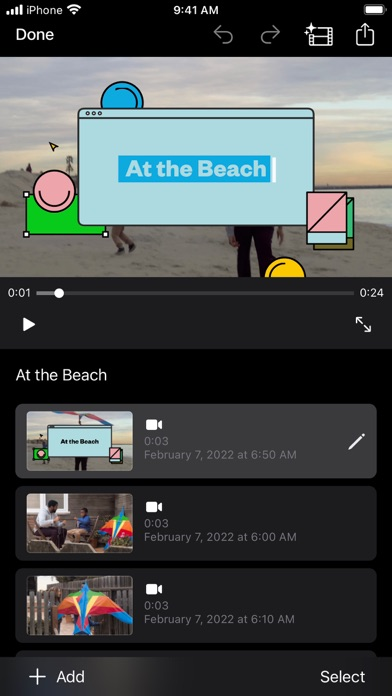
LumaFusion

What reviewers and users say
Our summaries of linked accounts—not our own experience or a vote-based ranking. Older versions and different platforms are labeled. Sources reviewed October 18, 2026.
TechRadar · Steve Paris
Dec 6, 2023 · iPhone and iPad
Paris finds the Movie, Storyboard and Magic Movie approaches approachable for beginners, but too limited for more involved editing.
Read in context: His device-specific glitch involved iOS 16 and did not reproduce across all tested devices. It is not evidence of a current universal bug or a Mac review.
Macworld
2018 iOS review · historical
The reviewer treats LumaFusion as a route to more serious video editing on iOS than a basic movie app.
Read in context: Useful background on product positioning, not evidence of today’s performance, price or add-ons.
How to read disagreement
Different opinions can reflect different jobs, versions, devices or paid plans. We do not call a few comments “the consensus.” A consequential factual conflict that remains after checking those differences is a candidate for a focused hands-on test. A preference for one interface over another usually is not.
Side by side
| Decision | iMovie on iPad | LumaFusion on iPad |
|---|---|---|
| Entry cost | Free | $29.99 base app; optional extras |
| Starting workflow | Guided or straightforward movie assembly | More configurable multitrack editing |
| Good reason to choose it | Your simple movie already fits | A specific editing requirement needs more controls |
| Keep separately | Playable movie and project | Playable movie, project and linked media |
Try the simpler editor first
Apple documents Movie, Storyboard and Magic Movie workflows. TechRadar’s iPhone/iPad review finds these approachable for beginners but limited for more involved editing. That is a version-specific reviewer assessment, not a current speed measurement.
Pay for a requirement, not a badge
LumaFusion is a more configurable timeline editor. Identify the arrangement of layers, audio work or interchange feature your project needs. The $29.99 base purchase does not mean every Creator Pass feature or separately listed add-on is included.
Keep an editable project
A finished video and an editable project solve different problems. Reopen the video in a separate player, and retain the project plus any externally linked source media if you expect to revise the edit.
Limitations & considerations
- iMovie: Mac and iPhone/iPad interfaces and export capabilities differ. Device requirements matter.
- iMovie: A playable movie and an editable project are different deliverables. Automatic speech-to-subtitle generation is not established here.
- LumaFusion: The $29.99 base app, Creator Pass and separately listed add-ons are distinct purchases.
- LumaFusion: An exported movie does not prove that an editable project contains all linked external media. Keep source files and project backups.
Documented features, attributed opinions and explicitly labeled hands-on observations are different kinds of evidence. We do not infer unmeasured performance or privacy guarantees.
Sources & scope
Reviewed October 18, 2026. These are provider-published sources; listings and feature access can change. This article uses the linked documentation; any hands-on observations are separately labeled.
- iMovie for iPad user guide
Apple documents Movie, Storyboard and Magic Movie projects, editing and sharing.
- iMovie iPhone and iPad listing
Apple listing; free download, device-dependent export capabilities. Mac edition is separate.
- Export projects in iMovie on iPad
Apple distinguishes editable project export from a finished video.
- LumaFusion for iOS features
Developer feature reference; purchased edition, add-ons and compatible hardware need separate verification.
- LumaFusion official reference guide
Official gateway to platform-specific manuals and in-app Help.