Subscribe to a website with NetNewsWire on iPhone or iPad
Find a feed, choose its account and verify that new items arrive.
 NetNewsWire
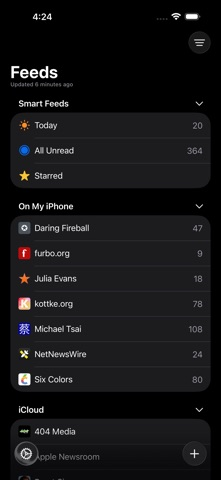 Step-by-step guide
The short answer
Add a website or direct feed address, choose the intended account and folder, then check that items arrive. The linked detailed help targets 6.1, while the current listing is version 7; use the equivalent controls in your installed version.
Is this the right fit?
NetNewsWire
iPhone · iPad · macOSRead RSS without a paid reader subscription
A practical starting point for following websites in a native Apple RSS client.
The tradeoff: Feed synchronization and permanent full-article archiving solve different problems.
Free open-source reader
Official website · no app fee · 2026-10-18 · Plan details & source
Explore NetNewsWire →Editorial selection advice based on the linked product documentation, attributed feedback and any explicitly labeled test results—not a universal winner.
See the apps, not just the feature list
Developer-published product images. Captions identify the platform and source; these are not our test captures.
NetNewsWire
What reviewers and users say
Our summaries of linked accounts—not our own experience or a vote-based ranking. Older versions and different platforms are labeled. Sources reviewed October 18, 2026.
MacStories · John Voorhees
NetNewsWire 5 for Mac · historical release
The review presents NetNewsWire as a solid native RSS foundation and discusses its article list and sharing workflow.
Read in context: Version 5 context; not a current feature inventory or an iPhone review.
NetNewsWire · App Store reader examples
US feed · 50 recent entries retrieved 2026-10-18. Up to one positive and one critical example selected from that feed; not a representative sentiment survey.
Bird0fHermes · 2026-09-23 · 5/5 · v7.1.4
“Syncs great with my personal Miniflux server. I like how…”Read the source feed ↗
UnhappyCommenter · 2026-10-07 · 3/5 · v7.1.4
“InoReader and Newsblur fail to import, feedly and feedbin both…”Read the source feed ↗
How to read disagreement
Different opinions can reflect different jobs, versions, devices or paid plans. We do not call a few comments “the consensus.” A consequential factual conflict that remains after checking those differences is a candidate for a focused hands-on test. A preference for one interface over another usually is not.
Side by side
| Symptom | Check first |
|---|---|
| Website not found | Try its explicitly published feed URL |
| Only an excerpt appears | Compare what the publisher puts in the feed |
| Missing on another device | Confirm the selected account and sync setup |
1. Choose one known source
Start with a site that publicly advertises an RSS or Atom feed. Keep its website URL and direct feed URL in a note. This gives you a recovery path if automatic discovery fails, and prevents confusing a website’s general feed with a category you did not intend to follow.
2. Decide where the subscription belongs
Before adding anything, identify whether you are using a local account or a synchronization service. Choose the same arrangement you intend to use after the trial. External services can have their own terms and fees; this walkthrough does not require purchasing one. Account selection is not proof of successful cross-device synchronization.
3. Add and inspect the feed
In the documented iPhone/iPad workflow, open the feed-adding control, enter the site address and choose the account and folder. If discovery fails, use the published direct feed URL. After adding, compare several item titles and dates with the publisher. Keep the exact current button labels in the supplied screen recording.
4. Practice a small reading session
Open two entries, leave another untouched and star one item you want to revisit. Return to the list and inspect its state. This is more useful than judging the app from an empty inbox: it shows whether your preferred daily routine fits the organization model. Reader view should also be checked against the publisher’s page.
5. Verify refresh and portability
Refresh later and distinguish an app error from a publisher that has simply not posted anything new. Export a small OPML subscription list and inspect its URLs before importing a large collection. OPML is a subscription-transfer format, not a promise that it contains article bodies, highlights or every account setting.
Evidence still required
We have not installed the current version or timed refreshes. Record the installed version and OS, one successful feed discovery and one direct-address addition. If you test synchronization, show the second device separately rather than presenting it as part of a local-only result.
Limitations & considerations
- The app is free, but an external synchronization service can have its own terms.
- RSS synchronization is not permanent full-article archiving. Older detailed help can differ from the current release.
Documented features, attributed opinions and explicitly labeled hands-on observations are different kinds of evidence. We do not infer unmeasured performance or privacy guarantees.
Sources & scope
Reviewed October 18, 2026. These are provider-published sources; listings and feature access can change. This article uses the linked documentation; any hands-on observations are separately labeled.
- NetNewsWire feed setup
Version 6.1 iPhone/iPad instructions; current version 7 interface requires verification.
- NetNewsWire overview
Current official product page describes version 7; device compatibility must be confirmed before installing.