Compress PDFs
Meet an upload limit without making the document unreadable.

The short answer
Compress a copy and check both file size and readability. Image-heavy scans may offer more room for reduction than an already optimized text document; no app can promise the same useful reduction for every PDF.
Which app fits your job?
Preview
macOS · iPhone · iPadTry the included Mac tool first
For ordinary viewing, annotation and page operations, start with the tool already on your Mac before installing a larger PDF suite.
The tradeoff: This profile covers Mac Preview, not feature parity with the iPhone edition.
Included with macOS
Apple documentation · included software · 2026-10-18 · Plan details & source
Explore Preview →PDFgear
iPhone · iPad · macOSStart with everyday PDF operations
A sensible shortlist for merging, reading and other routine document tasks. Use the platform-specific documentation: desktop and mobile tools are not interchangeable.
The tradeoff: Do not assume every desktop editing or AI feature exists on iPhone.
Free iPhone and iPad download
US App Store · USD · 2026-10-18 · Plan details & source
Explore PDFgear →Adobe Acrobat Reader
iPhone · iPad · macOSRead, comment and work within Adobe
Shortlist it when other people already exchange documents through Acrobat, or you need a familiar PDF reader with an upgrade path.
The tradeoff: Reader is not the same product entitlement as Acrobat Pro. Check which editing and conversion actions require payment.
Free reader · paid Premium offers
US App Store · USD · 2026-10-18 · Plan details & source
Explore Adobe Acrobat Reader →Editorial selection advice based on the linked product documentation, attributed feedback and any explicitly labeled test results—not a universal winner.
See the apps, not just the feature list
Developer-published product images. Captions identify the platform and source; these are not our test captures.
Preview
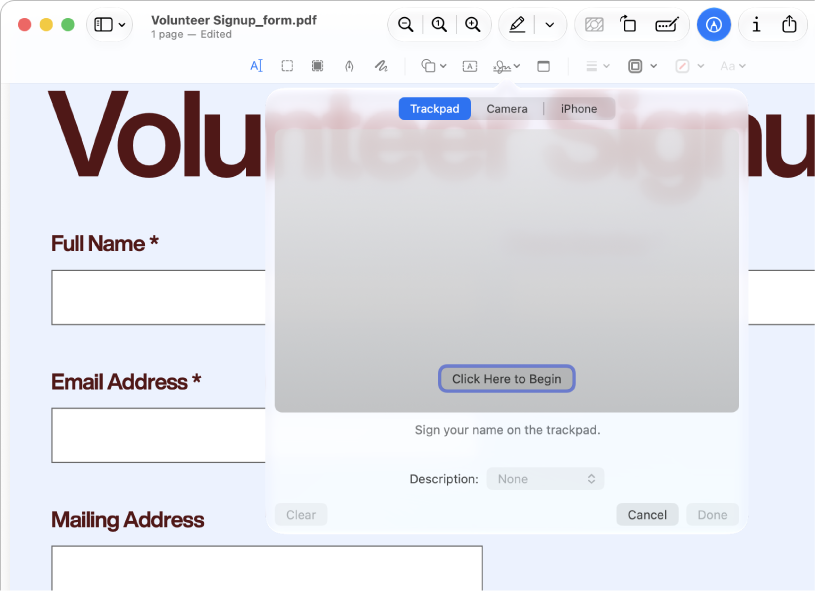
Apple documentation image; interface depends on macOS version.
PDFgear
Adobe Acrobat Reader
What reviewers and users say
Our summaries of linked accounts—not our own experience or a vote-based ranking. Older versions and different platforms are labeled. Sources reviewed October 18, 2026.
Macworld · Chris Barylick
May 24, 2022 · Preview 11 / macOS Monterey 12.4
Barylick finds the included Preview useful for everyday forms, signatures and basic PDF changes before considering an Acrobat upgrade.
Read in context: A historical Mac comparison. Its old prices and format limitations are not current facts or evidence about iPhone Preview.
Macworld · Chris Barylick
May 24, 2022 · Mac Reader versus paid Acrobat editions
The reviewer distinguishes the free Reader from paid Acrobat tools and criticizes the upgrade-oriented experience when basic PDF work is the goal.
Read in context: Desktop and historical context, not a benchmark of the current iOS interface, mobile editing access or current subscription price.
PDFgear · App Store reader examples
US feed · 50 recent entries retrieved 2026-10-18. Up to one positive and one critical example selected from that feed; not a representative sentiment survey.
anonymous ladybug sam · 2026-10-11 · 5/5 · v2.29
“I used to use preview to view my first aid…”Read the source feed ↗
Idkwhyuneedaname · 2026-10-15 · 1/5 · v2.29
“After the lastest update the program broke and no longer…”Read the source feed ↗
How to read disagreement
Different opinions can reflect different jobs, versions, devices or paid plans. We do not call a few comments “the consensus.” A consequential factual conflict that remains after checking those differences is a candidate for a focused hands-on test. A preference for one interface over another usually is not.
Compare your options
| Approach | Intended result | Tradeoff | Evidence boundary |
|---|---|---|---|
| Preview on Mac | Smaller PDF export | Image detail must be inspected | Apple size-reduction guide |
| PDFgear app | Compressed PDF | Vendor claims not independently measured | Official compressor page |
| Acrobat mobile | Compressed PDF | Subscription entitlement | Adobe mobile plans |
Define the constraint
Write down the recipient’s maximum size and whether the result will be read on screen or printed. There is no benefit in aggressively shrinking a file that already fits. Keep the original and avoid repeatedly compressing an already degraded export.
A smaller PDF is not necessarily a better PDF. Inspect small type, handwritten marks, fine diagrams, color distinctions and page orientation. Confirm that searchable text still works when searchability matters.
Compare feasible methods
Preview on Mac provides a documented size-reduction route. PDFgear markets free app compression on iPhone/iPad and Mac. Acrobat lists mobile compression among subscription functions. These are candidate paths, not measured quality rankings.
If you use an online compressor, review where processing occurs and do not upload sensitive files without permission. A ZIP archive is not interchangeable with a smaller PDF when a portal requires a PDF attachment.
Know when to stop
Some source files leave little room for meaningful reduction. If acceptable quality still exceeds the limit, consider splitting the submission only if the recipient allows multiple files, or request another delivery method. Do not claim guaranteed lossless compression or a fixed percentage saving without inspecting the actual output.
Our planned test will retain original and compressed files at each setting. Until it runs, processing speed, visual quality and file-size savings remain explicitly unmeasured.
Limitations & considerations
- Preview: Mac and mobile Preview have different controls and system requirements; the linked Mac instructions do not establish mobile feature parity.
- PDFgear: Desktop and mobile feature lists are not interchangeable. Use the instructions for your target platform.
- Adobe Acrobat Reader: Free Reader, mobile Premium and desktop Acrobat Pro are different entitlements.
Documented features, attributed opinions and explicitly labeled hands-on observations are different kinds of evidence. We do not infer unmeasured performance or privacy guarantees.
Sources & scope
Reviewed October 18, 2026. These are provider-published sources; listings and feature access can change. This article uses the linked documentation; any hands-on observations are separately labeled.
- Reduce a PDF in Preview on Mac
Apple instructions for PDF size reduction; not evidence of output quality.
- PDFgear compressor
Vendor advertises free offline app compression; no reduction percentage independently verified.
- Acrobat mobile subscription scope
Mobile-only plans are not equivalent to full desktop Acrobat subscriptions.