Prepare and check subtitles with TinyStudio on Mac
Prepare a local model, import a recording and review the exported subtitles.
 TinyStudio
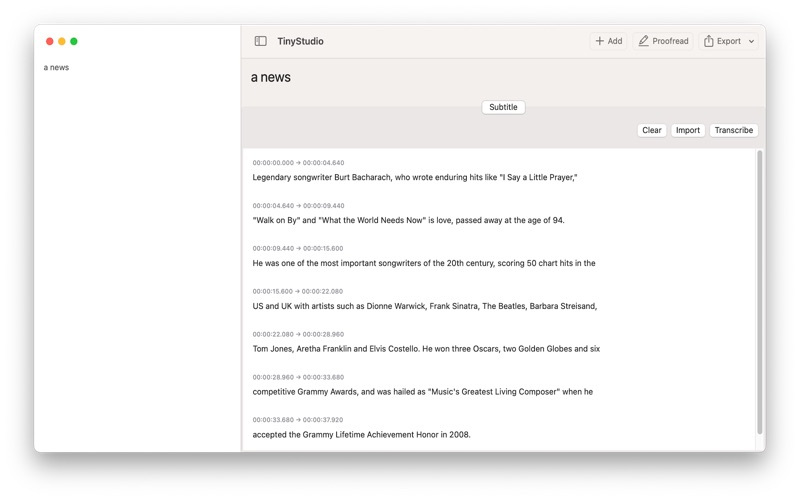 Step-by-step guide
The short answer
Use this draft as a preparation and verification checklist for a TinyStudio subtitle run, not a claim that we have executed the latest app. The intended result is a corrected, timed subtitle file that plays with your video.
Is this the right fit?
TinyStudio
macOSA focused Mac subtitle workflow
Shortlist it when the deliverable is a subtitle file rather than a multitrack video project. Read the model-setup instructions before getting started.
The tradeoff: The Mac App Store listing is free. The 2023 model-preparation guide can differ from current controls; no accuracy or speed benchmark is implied.
Free Mac download
US App Store · USD · 2026-10-18 · Plan details & source
Explore TinyStudio →Editorial selection advice based on the linked product documentation, attributed feedback and any explicitly labeled test results—not a universal winner.
See the apps, not just the feature list
Developer-published product images. Captions identify the platform and source; these are not our test captures.
TinyStudio
What reviewers and users say
Our summaries of linked accounts—not our own experience or a vote-based ranking. Older versions and different platforms are labeled. Sources reviewed October 18, 2026.
TinyStudio · External coverage: Exact-name and developer-name searches reviewed October 18, 2026 mainly surfaced developer material and listing mirrors. No suitable independent evaluation is included yet. Official documentation and the Mac App Store listing support product facts, not a claim of independent endorsement.
How to read disagreement
Different opinions can reflect different jobs, versions, devices or paid plans. We do not call a few comments “the consensus.” A consequential factual conflict that remains after checking those differences is a candidate for a focused hands-on test. A preference for one interface over another usually is not.
1. Prepare a safe test clip
Choose a short recording you own or have permission to process. Keep the original and write down its length, language and a few difficult names. A staged clip is preferable to a private client video while checking an unfamiliar workflow. Decide whether your destination needs a sidecar subtitle file or visible captions baked into a movie; those are different deliverables.
2. Prepare the recognition model
The developer has published model-download instructions. Follow the current app’s model interface rather than assuming a 2023 screenshot matches the installed build. Record the model name and wait until preparation is complete before timing recognition. If a download fails, retain the error instead of treating a failed setup as a recognition result.
The linked model-preparation guide is from 2023. Use its setup principles, but follow the controls and model locations in your installed release.
3. Generate, then proofread
Import the test recording using the installed interface and capture its selected settings. Start a separate timer for processing, then another for manual correction. Compare the output against the audio: check names, dates, negations and quiet sections. Never publish a caption solely because it looks like fluent text.
Look at cue boundaries as well as words. A correct sentence delivered too early or split into unreadable fragments is still a captioning problem. Record any operations that require a different tool.
4. Validate the exported deliverable
Save the available timed export and open it in a separate compatible player with the original video. Check the opening, a middle passage and the final minute, then watch the full short clip. Keep both untouched and corrected outputs. If the app cannot provide the required format, state that limitation rather than renaming a file.
After models are prepared, repeat with networking disconnected. Successful completion supports a narrowly described offline workflow; it is not proof about all online telemetry or integrations.
Limitations & considerations
- The model-preparation article dates from 2023; its controls may differ from the current release.
- A local subtitle workflow needs model preparation. No comparative accuracy or speed result is established here.
Documented features, attributed opinions and explicitly labeled hands-on observations are different kinds of evidence. We do not infer unmeasured performance or privacy guarantees.
Sources & scope
Reviewed October 18, 2026. These are provider-published sources; listings and feature access can change. This article uses the linked documentation; any hands-on observations are separately labeled.
- TinyStudio model download instructions
Developer instructions for model preparation, dated June 2023; current UI needs device verification.
- TinyStudio official site
Developer description of a Whisper-based Mac subtitle app; performance testimonials are not independent evidence.