TinyStudio vs MacWhisper for making subtitles on Mac
Choose a focused subtitle workflow or a broader transcript workspace, with current purchase information and source context.
 TinyStudio
 MacWhisper
The short answer
Choose TinyStudio for a focused Mac subtitle workflow. Choose MacWhisper when reviewing, reusing and exporting transcripts is a larger part of your work. TinyStudio’s Mac listing is free; MacWhisper offers Free and Pro editions. Neither positioning establishes an accuracy or speed winner.
Which app fits your job?
TinyStudio
macOSA focused Mac subtitle workflow
Shortlist it when the deliverable is a subtitle file rather than a multitrack video project. Read the model-setup instructions before getting started.
The tradeoff: The Mac App Store listing is free. The 2023 model-preparation guide can differ from current controls; no accuracy or speed benchmark is implied.
Free Mac download
US App Store · USD · 2026-10-18 · Plan details & source
Explore TinyStudio →MacWhisper
macOSTurn recordings into reusable transcripts
Shortlist it when you need transcript editing and exports as well as captions. Pick a local model when the intended workflow is on-device.
The tradeoff: Model, hardware and optional cloud features change the tradeoff. A single reviewer’s speed result is not a universal benchmark.
Free edition · Pro €64 one-time
Vendor website · EUR · 2026-10-18 · Plan details & source
Explore MacWhisper →Editorial selection advice based on the linked product documentation, attributed feedback and any explicitly labeled test results—not a universal winner.
See the apps, not just the feature list
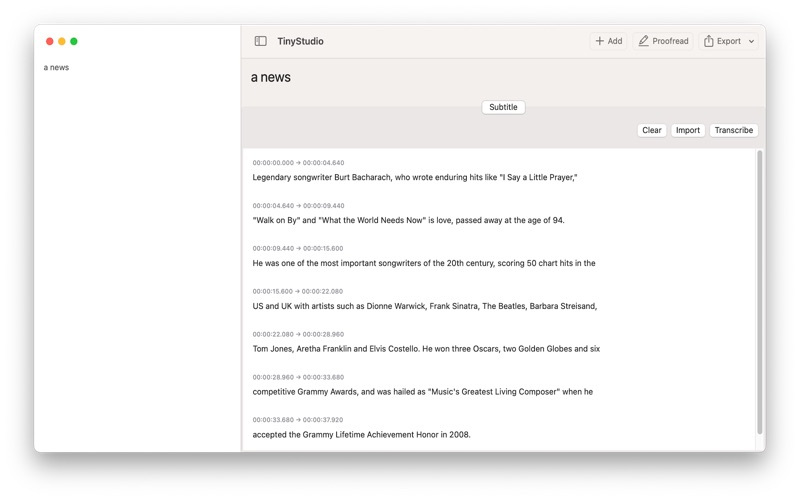
Developer-published product images. Captions identify the platform and source; these are not our test captures.
TinyStudio
MacWhisper
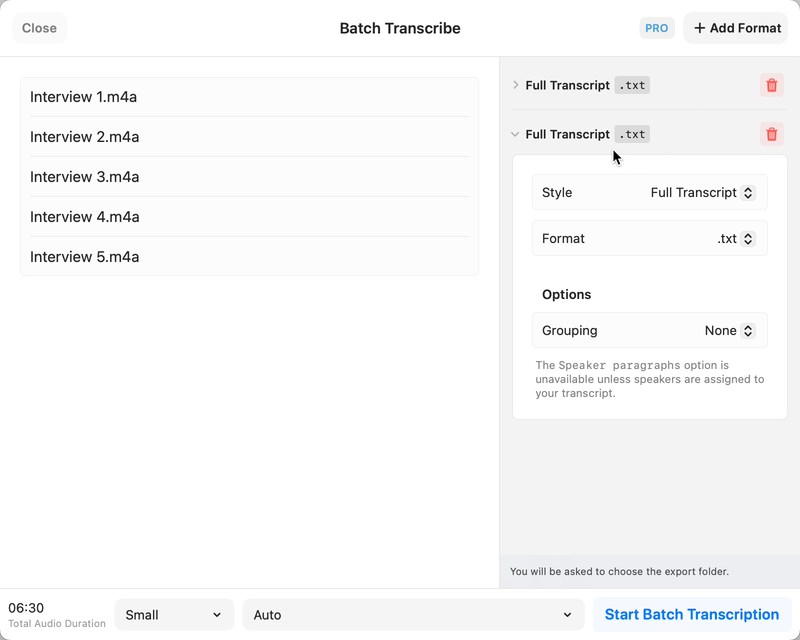
Still from the official batch-transcription demo, not our test capture.
What reviewers and users say
Our summaries of linked accounts—not our own experience or a vote-based ranking. Older versions and different platforms are labeled. Sources reviewed October 18, 2026.
9to5Mac · Zac Hall
Dec 6, 2024 · MacWhisper 11 / 11.1
Hall welcomes the transcript-view redesign and sidebar, and covers the menu-bar dictation workflow.
Read in context: An older release article partly reproducing the developer’s announcement—not an independent accuracy or speed benchmark.
r/macapps · CtrlAltDelve
MacWhisper 12.2-era · Parakeet vs Whisper · M1 Max
This user prefers Parakeet for quickly turning long spoken notes into readable text, while acknowledging errors in names.
Read in context: One recording and one machine, not our benchmark. The post updates an initially reported crash as fixed; do not repeat it as an unresolved current bug.
TinyStudio · External coverage: Exact-name and developer-name searches reviewed October 18, 2026 mainly surfaced developer material and listing mirrors. No suitable independent evaluation is included yet. Official documentation and the Mac App Store listing support product facts, not a claim of independent endorsement.
How to read disagreement
Different opinions can reflect different jobs, versions, devices or paid plans. We do not call a few comments “the consensus.” A consequential factual conflict that remains after checking those differences is a candidate for a focused hands-on test. A preference for one interface over another usually is not.
Side by side
| Decision | TinyStudio | MacWhisper |
|---|---|---|
| Main fit | Focused subtitles | Transcript review and subtitle exports |
| Current purchase information | Free Mac App Store listing | Free edition; Pro €64 one-time on vendor site |
| Preparation | Model setup documented in an older guide | Select local model and edition features |
| Privacy boundary | Do not infer a network audit from a product description | Local models and optional cloud actions are distinct |
Choose the deliverable
A subtitle-first workflow ends with readable cues and timing. A transcript workspace is useful when you also need to review interviews, edit speaker information or reuse the text. Pick the workflow you need rather than the longest feature list.
Account for setup and processing route
Local recognition requires model preparation. MacWhisper also offers optional cloud integrations; those are not the same processing route as a local model. TinyStudio’s older setup article should be read alongside the current installed controls.
What outside accounts add
The linked MacWhisper accounts discuss transcript navigation, dictation and model-dependent workflows. Their version and hardware context are labeled. They do not establish a same-recording benchmark against TinyStudio.
Limitations & considerations
- TinyStudio: The model-preparation article dates from 2023; its controls may differ from the current release.
- TinyStudio: A local subtitle workflow needs model preparation. No comparative accuracy or speed result is established here.
- MacWhisper: Local models and optional cloud/API integrations are different processing routes; select the route appropriate for the recording.
- MacWhisper: Free and Pro features differ. Website Pro licensing and the App Store Whisper Transcription edition are separate entitlements.
Documented features, attributed opinions and explicitly labeled hands-on observations are different kinds of evidence. We do not infer unmeasured performance or privacy guarantees.
Sources & scope
Reviewed October 18, 2026. These are provider-published sources; listings and feature access can change. This article uses the linked documentation; any hands-on observations are separately labeled.
- TinyStudio official site
Developer description of a Whisper-based Mac subtitle app; performance testimonials are not independent evidence.
- MacWhisper official website
Official capabilities and free/Pro overview. Local transcription and optional cloud AI are distinct workflows.