Learn languages through shows and subtitles
Build a repeatable watch, save and review routine around material you can partly understand.

The short answer
Start from one usable show or channel on your actual device, then choose how subtitle lookup and later vocabulary review will work.
Side by side
| Your situation | Useful route | Check before choosing |
|---|---|---|
| Choosing a tool | Read a function-led selection | Task fit and platform |
| A limit decides eligibility | Read the condition-specific guide | Current plan and output boundaries |
| Ready to carry out the task | Follow the relevant tutorial | Inputs, steps and saved result |
Which content and device do you need?
A dedicated catalogue and a desktop extension answer different access problems. Check a real title, target audio and subtitle tracks in your region before comparing total show counts.
Choose the matching route
- Phone-based catalogue viewing and a word bank: inspect Lingopie’s available mobile route.
- Existing Netflix/YouTube on a laptop: inspect Language Reactor for desktop Chrome.
- Free-first learning: separate supplied subtitles from paid speech recognition and cross-feature saving.
- Already chose Lingopie: use the walkthrough to click, save and review a short scene.
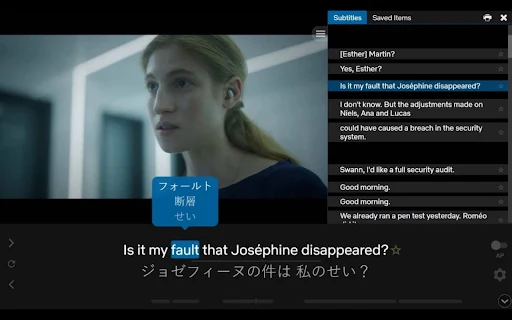
End a session with something to review
Keep three to five useful words or expressions and the scene they came from. Lingopie documents a clicked-word bank and flashcards; Language Reactor’s free/Pro saving rules differ by feature. A paid video subscription alone does not create a review habit.
Limitations & considerations
- Use the current official access and purchase terms for your actual account and country.
Use the linked official pages for current platform, access and purchase conditions.
Sources & scope
Reviewed October 24, 2026. Product facts follow the linked provider documentation. Selection advice, example prompts and explanatory diagrams are iApp4Me editorial guidance. Availability and plan terms are dated October 24, 2026.
- Lingopie: what it is and how to learn
Watching, clickable vocabulary, speed and flashcard review.
- Lingopie: subscription plans
Plan and trial conditions differ by purchase channel; monthly exception noted.
- Language Reactor: official Chrome Web Store listing
Developer listing describes desktop Chrome, Netflix and YouTube support.
- Language Reactor: free and Pro features
Provider distinctions for subtitle sources, vocabulary saving and memory.
- Lingopie: browser extension guide
Extension setup, vocabulary and connectivity requirements.