Apps for Learning Languages with TV Shows and Dual Subtitles
Choose a viewing-and-review workflow that fits your device, content access and study habits.

The short answer
Choose Lingopie when you want a dedicated viewing-and-vocabulary workflow. Choose Language Reactor when desktop Chrome and supported Netflix or YouTube material fit your routine. The key difference is where the content comes from and how words return for review, not simply whether both products display two subtitle lines.
Side by side
| Your situation | Useful route | Check before choosing |
|---|---|---|
| Dedicated viewing and vocabulary | Lingopie | Language catalog, device and purchase terms |
| Netflix or YouTube on desktop Chrome | Language Reactor | Source subscription and subtitle tracks |
| Mostly phone-based study | Check native/mobile workflow first | Do not assume desktop extension support |
Decide what kind of viewing you will maintain
A useful language-learning session needs comprehensible material and a small amount of active review. Choose a topic you already understand and a clip short enough to revisit. A familiar scene can be more useful than a difficult full episode watched with constant pauses.
Write down your device, target language and preferred content source. If most study happens on a phone during a commute, a desktop extension is not a complete fit. If you already watch suitable videos on a laptop, a browser tool may be easier to add than another content subscription.
Lingopie: a dedicated watch-and-review route
Lingopie’s help describes watching with subtitles, clicking words for translations and collecting vocabulary for flashcard review. Its plan documentation includes dual subtitles and learning tools. This is a relevant shortlist when you want viewing and vocabulary to live in one service.
Check the actual catalog for your target language and region before purchasing. A large overall show count does not establish that there are enough suitable titles for your level. Choose a short sample and look at the dialogue density, not just the poster or genre.
Language Reactor: a desktop browser route
Language Reactor’s developer listing describes desktop Chrome support on Windows and macOS, with tools for Netflix and YouTube including dual subtitles, a popup dictionary and playback controls. It is not a native iPhone substitute simply because both products concern video learning.
The tool and the content source are separate. Access to an extension does not include a Netflix subscription or guarantee subtitle availability for every video. Before organizing a study routine around a particular show, confirm that the source provides usable language tracks in your location.
Language Reactor: official Chrome Web Store listing
Image source and original context
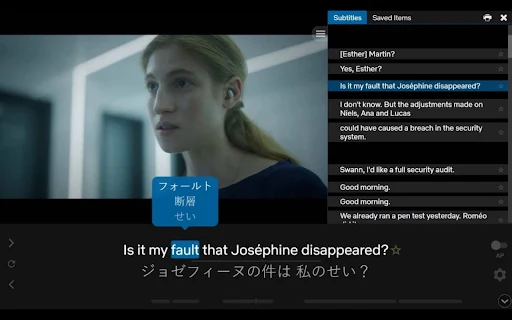
Compare what happens after an interesting word
Dual subtitles help you understand the scene, but the learning workflow continues after you pause. Can you save a useful phrase? Can you return to its context? Is review part of the free access or a paid feature? Those questions distinguish a convenient viewer from a routine you will actually repeat.
Limit new vocabulary to a manageable set. Save phrases that express something you might say, rather than every unfamiliar word. Keep the original sentence or scene context so a translation does not become a disconnected flashcard. A small set you review is more useful than a large list you never reopen.
Choose by your next ten sessions
Choose the dedicated service if its available content and device experience make regular study easier. Choose the browser route if the videos you already watch provide the right subtitles and you are comfortable studying at a laptop. Recheck plan conditions for saving, export and advanced subtitle features.
For either route, set a short cycle: watch a scene, revisit difficult lines, save a few phrases and review later. The product can make that cycle convenient, but a subscription alone does not establish language progress. Judge the fit by the routine it enables.
Limitations & considerations
- Check current access and purchase terms for your country and account before paying.
Use the linked official pages for current platform, access and purchase conditions.
Sources & scope
Reviewed October 24, 2026. Product facts follow the linked provider documentation. Selection advice and example prompts are iApp4Me editorial guidance. Screenshots and provider examples are credited beside each image. Availability and plan terms are dated October 24, 2026.
- Lingopie: what it is and how to learn
Watching, clickable vocabulary, speed and flashcard review.
- Lingopie: subscription plans
Plan and trial conditions differ by purchase channel; monthly exception noted.
- Language Reactor: official Chrome Web Store listing
Developer listing describes desktop Chrome, Netflix and YouTube support.
- Language Reactor: free and Pro features
Provider distinctions for subtitle sources, vocabulary saving and memory.
No comments yet. Be the first to share your experience.