Scan documents into PDFs
Turn paper into a readable file, and add searchable text only when needed.
The short answer
A good scan starts with sharp, evenly lit capture. Choose a dedicated scanner when repeated capture, organization or OCR justifies it; a searchable PDF requires text recognition, not merely saving a photograph as PDF.
Which app fits your job?
Scanner Pro
iPhone · iPadTurn paper into an organized document library
Look here when scanning, recognizing text and exporting documents are recurring work, not just an occasional camera capture.
The tradeoff: OCR and workflow features can depend on your purchase entitlement.
Free download · Plus pricing requires checkout
US App Store · USD · 2026-10-18 · Plan details & source
Explore Scanner Pro →Preview
macOS · iPhone · iPadTry the included Mac tool first
For ordinary viewing, annotation and page operations, start with the tool already on your Mac before installing a larger PDF suite.
The tradeoff: This profile covers Mac Preview, not feature parity with the iPhone edition.
Included with macOS
Apple documentation · included software · 2026-10-18 · Plan details & source
Explore Preview →Editorial selection advice based on the linked product documentation, attributed feedback and any explicitly labeled test results—not a universal winner.
See the apps, not just the feature list
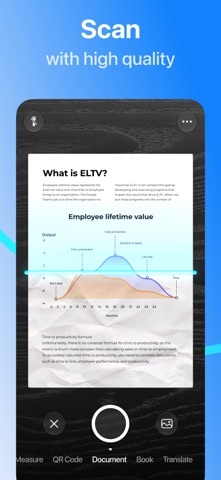
Developer-published product images. Captions identify the platform and source; these are not our test captures.
Scanner Pro
Preview
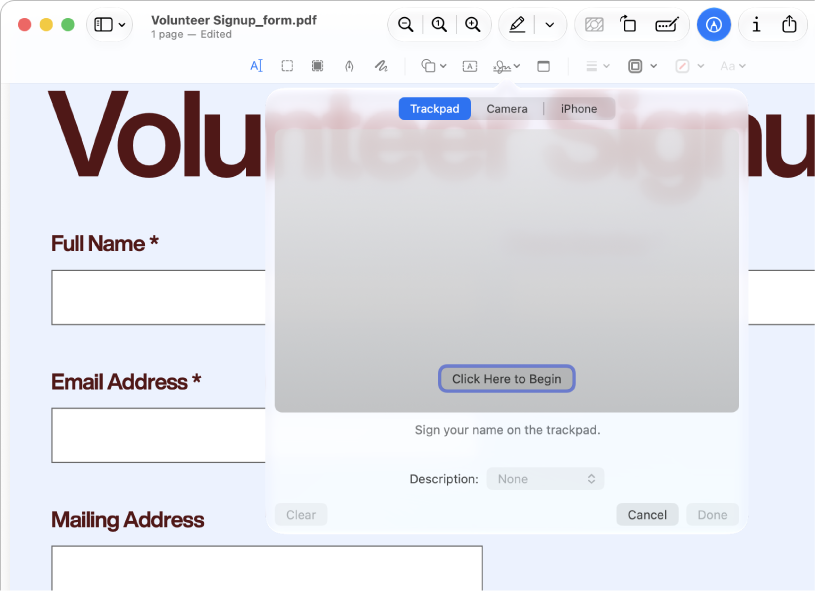
Apple documentation image; interface depends on macOS version.
What reviewers and users say
Our summaries of linked accounts—not our own experience or a vote-based ranking. Older versions and different platforms are labeled. Sources reviewed October 18, 2026.
App Store · kcezz
May 27, 2025 · US listing · version not stated
A student describes scanning homework for digital submission, valuing edge detection, adjustable cropping and correction of angled captures.
Read in context: One everyday scanning account, not a measured OCR-accuracy comparison or proof of the current free entitlement.
App Store · Ipad4me2
Jun 19, 2025 · historical workflow report
A long-time user reports lost automation workflows. Their later update says scan renaming and a newly created workflow work again, while the old workflows remain lost.
Read in context: Do not repeat the renaming failure as still unresolved. This is a user report, not our reproduction of the current app or proof that backups are currently unavailable.
Macworld · Chris Barylick
May 24, 2022 · Preview 11 / macOS Monterey 12.4
Barylick finds the included Preview useful for everyday forms, signatures and basic PDF changes before considering an Acrobat upgrade.
Read in context: A historical Mac comparison. Its old prices and format limitations are not current facts or evidence about iPhone Preview.
Scanner Pro · App Store reader examples
US feed · 50 recent entries retrieved 2026-10-18. Up to one positive and one critical example selected from that feed; not a representative sentiment survey.
Pourmalla · 2026-10-16 · 4/5 · v9.0.2
“Dear Readdle Support Team, I have been using Scanner Pro…”Read the source feed ↗
Josie Sam · 2026-10-15 · 1/5 · v9.0.2
“After a major update, the app struggles to scan and…”Read the source feed ↗
How to read disagreement
Different opinions can reflect different jobs, versions, devices or paid plans. We do not call a few comments “the consensus.” A consequential factual conflict that remains after checking those differences is a candidate for a focused hands-on test. A preference for one interface over another usually is not.
Compare your options
| Approach | Intended result | Tradeoff | Evidence boundary |
|---|---|---|---|
| Built-in mobile scanning | A document capture | Capture and export controls depend on the operating system | Device validation required |
| Scanner Pro | Organized scans with optional OCR | Free watermark and Plus boundaries need confirmation | Readdle capture/OCR/export help |
Separate capture from recognition
First inspect the image: all four corners, complete margins, readable small text and the correct page order. Then decide whether searchable text or an editable document is necessary. OCR adds recognition; it does not repair missing content or establish that every recognized word is correct.
Receipts, flat office pages and bound books pose different capture problems. Use representative documents rather than choosing an app from one unusually easy page. Do not include personal records in publicly shared test materials.
What a dedicated scanner changes
Scanner Pro documents camera capture, imported images, OCR and several export formats. Its OCR guidance distinguishes new subscription users from previous purchasers, so an existing paid installation is not enough to establish the experience of a new customer.
A built-in scanner may be enough for an occasional document. Before recommending a paid scanner, compare the whole workflow: capture corrections, page naming, locating the export and opening it outside the app. A cleaner in-app preview is not useful if the delivered file is watermarked or hard to find.
Verify the deliverable
Export a PDF, reopen it in a second reader and search for a known phrase. Check several recognized numbers manually, especially dates and account-like strings in synthetic fixtures. The vendor describes on-device OCR, but cloud sync and share-link features have separate behavior and should be assessed separately.
Limitations & considerations
- Scanner Pro: The public US in-app purchase list does not state the billing periods for several Plus amounts. Confirm the period and eligibility on the purchase sheet.
- Scanner Pro: OCR and advanced export access depend on entitlement; legacy buyers can have different access. On-device OCR does not make every cloud destination local.
- Preview: Mac and mobile Preview have different controls and system requirements; the linked Mac instructions do not establish mobile feature parity.
- Preview: Size-reduction filters can degrade images or fine text. Keep the original PDF.
Documented features, attributed opinions and explicitly labeled hands-on observations are different kinds of evidence. We do not infer unmeasured performance or privacy guarantees.
Sources & scope
Reviewed October 18, 2026. These are provider-published sources; listings and feature access can change. This article uses the linked documentation; any hands-on observations are separately labeled.
- Scanner Pro OCR help
Vendor describes on-device OCR and different entitlements for previous buyers and new customers.
- Scanner Pro export guide
Documents export formats and watermark/Plus boundaries; requires purchase-screen confirmation.
- Scanner Pro tools
Lists capture, import, export and document tools.