Edit and sign PDFs
Distinguish annotation, form filling, content editing and signature workflows.

The short answer
Choose the smallest tool that performs the actual job. Writing a comment or placing a visible signature is not the same as changing existing PDF text, redacting information or applying a certificate-based digital signature.
Which app fits your job?
Preview
macOS · iPhone · iPadTry the included Mac tool first
For ordinary viewing, annotation and page operations, start with the tool already on your Mac before installing a larger PDF suite.
The tradeoff: This profile covers Mac Preview, not feature parity with the iPhone edition.
Included with macOS
Apple documentation · included software · 2026-10-18 · Plan details & source
Explore Preview →PDF Expert
iPhone · iPad · macOSAnnotate and manage PDFs on Apple devices
Shortlist it for a document workspace with reading, markup and paid editing capabilities rather than one isolated conversion.
The tradeoff: Check the current plan for your target device; a review of the Mac version does not establish iPad feature access.
Free download · paid editing plans
Vendor website · EUR · 2026-10-18 · Plan details & source
Explore PDF Expert →Adobe Acrobat Reader
iPhone · iPad · macOSRead, comment and work within Adobe
Shortlist it when other people already exchange documents through Acrobat, or you need a familiar PDF reader with an upgrade path.
The tradeoff: Reader is not the same product entitlement as Acrobat Pro. Check which editing and conversion actions require payment.
Free reader · paid Premium offers
US App Store · USD · 2026-10-18 · Plan details & source
Explore Adobe Acrobat Reader →Editorial selection advice based on the linked product documentation, attributed feedback and any explicitly labeled test results—not a universal winner.
See the apps, not just the feature list
Developer-published product images. Captions identify the platform and source; these are not our test captures.
Preview
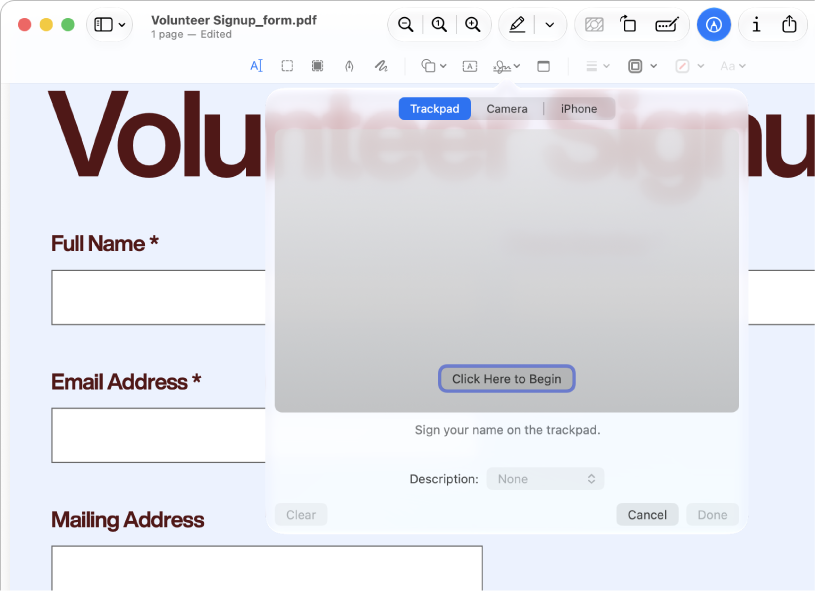
Apple documentation image; interface depends on macOS version.
PDF Expert
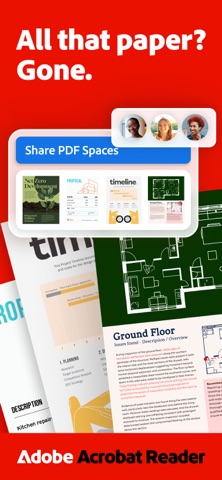
Adobe Acrobat Reader
What reviewers and users say
Our summaries of linked accounts—not our own experience or a vote-based ranking. Older versions and different platforms are labeled. Sources reviewed October 18, 2026.
Macworld · Chris Barylick
May 24, 2022 · Preview 11 / macOS Monterey 12.4
Barylick finds the included Preview useful for everyday forms, signatures and basic PDF changes before considering an Acrobat upgrade.
Read in context: A historical Mac comparison. Its old prices and format limitations are not current facts or evidence about iPhone Preview.
Apple App Store editorial
US listing editorial feature · publication date not supplied
Apple’s editorial feature emphasizes organizing, annotating and editing documents on iPad.
Read in context: Store editorial is distinct from an independent comparative benchmark or a customer review. The endorsement does not establish which features are free.
Macworld · Chris Barylick
May 24, 2022 · Mac Reader versus paid Acrobat editions
The reviewer distinguishes the free Reader from paid Acrobat tools and criticizes the upgrade-oriented experience when basic PDF work is the goal.
Read in context: Desktop and historical context, not a benchmark of the current iOS interface, mobile editing access or current subscription price.
How to read disagreement
Different opinions can reflect different jobs, versions, devices or paid plans. We do not call a few comments “the consensus.” A consequential factual conflict that remains after checking those differences is a candidate for a focused hands-on test. A preference for one interface over another usually is not.
Compare your options
| Approach | Intended result | Tradeoff | Evidence boundary |
|---|---|---|---|
| Built-in markup | Basic visual annotations where supported | Not full text editing | Use the instructions for your platform |
| PDF Expert | PDF workspace and signature export options | Premium coverage varies | Official signing and plan documentation |
| Acrobat Reader | Free basic work plus paid document tools | Mobile and desktop entitlements differ | Adobe help |
Name the operation
If you need to highlight a paragraph, you need annotation. If a form exposes fields, you may only need form filling. If you need to rewrite an existing sentence, you need content editing and should inspect font substitution and layout after export.
Drawing a signature onto a page can be enough for some ordinary exchanges, but it is not a universal substitute for a recipient’s required signing process. Ask the recipient what they accept. This page is a workflow guide, not legal advice about signature validity.
Compare plans as well as apps
Adobe distinguishes free Reader capabilities from paid mobile editing and conversion. PDF Expert offers premium plans with platform-specific coverage. Compare what your actual account can do on your actual device; a feature on a marketing page may require a different purchase.
For simple markup, investigate the built-in option before subscribing. For repeated document work, evaluate PDF Expert and Acrobat on the same sample form and annotated document. Neither receives a usability winner label before our device test.
Export is part of editing
Editable annotations and flattened copies serve different recipients. Reopen the shared copy outside the authoring app and confirm that comments, signatures and fields appear as intended. Keep the editable original when another review round is expected. Do not treat drawing a dark rectangle over text as verified secure redaction.
Limitations & considerations
- Preview: Mac and mobile Preview have different controls and system requirements; the linked Mac instructions do not establish mobile feature parity.
- PDF Expert: The vendor’s one-time €149.99 offer is Mac-only; it does not unlock iPhone/iPad editing. The €84.99 annual website offer covers the Apple-device plan.
- Adobe Acrobat Reader: Free Reader, mobile Premium and desktop Acrobat Pro are different entitlements.
Documented features, attributed opinions and explicitly labeled hands-on observations are different kinds of evidence. We do not infer unmeasured performance or privacy guarantees.
Sources & scope
Reviewed October 18, 2026. These are provider-published sources; listings and feature access can change. This article uses the linked documentation; any hands-on observations are separately labeled.
- PDF Expert signing instructions
Official iOS signature and export workflow, not a comparison test.
- PDF Expert plans
Annual and Mac-only lifetime offers are different entitlements; verify local purchase screen.
- Acrobat Reader for iOS help
Documents free reading/signing/annotation and premium document operations.
- Acrobat mobile subscription scope
Mobile-only plans are not equivalent to full desktop Acrobat subscriptions.