PDF Extractor
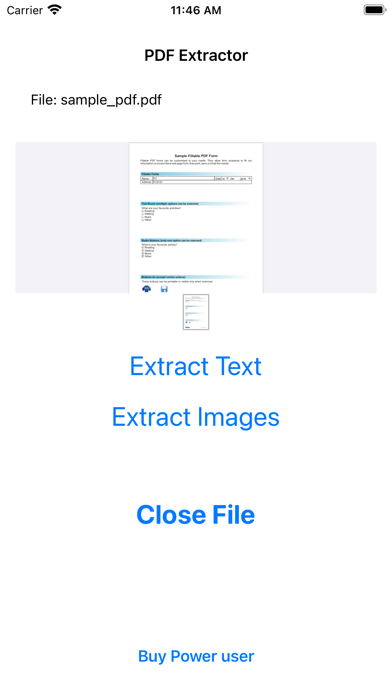
A focused iPhone and iPad utility for extracting text and pictures from PDFs, rather than editing complete documents.
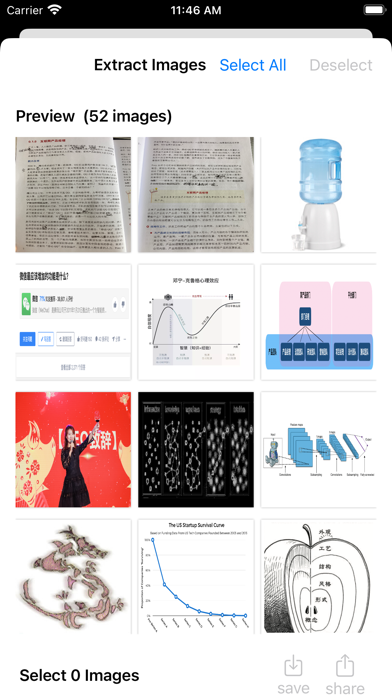
Extract selected pictures on iPhone
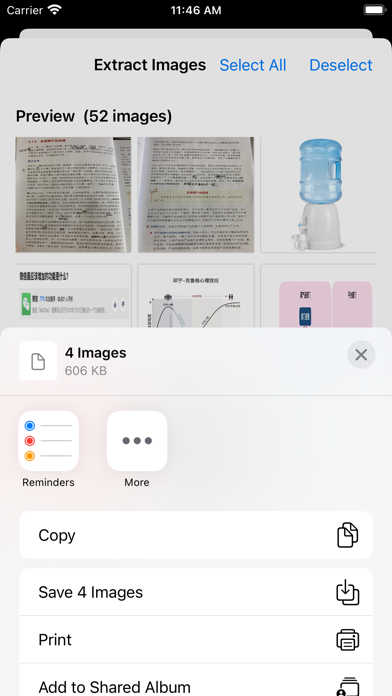
Choose it for a focused picture-selection workflow rather than a full PDF editor. Our small iPhone sample saved four images together to Photos.
Before you choose: Transparency was lost in the returned sample. Do not choose this save path for alpha-sensitive graphics.
Visit the official product page →The essentials
- Platforms
- iPhone · iPad
- Purchase model
- Free download · $2.99 Full Access offer
- Developer / project
- Hao Peiqiang / Shanghai TinyNetwork
- US App Store snapshot
- v1.01 · minimum OS 15.0 · Free to download. In-app purchases may be additional.
Checked 2026-10-18 · Verify current listing - App Store rating
- 1.0/5 · 1 ratings · US · 2026-10-18
Apple listing snapshot, not an iApp4Me score or a rating of one particular feature.
Price & purchase options
- Download: Free
- Get Full Access: $2.99 (listed in-app purchase)
The public listing names the unlock but does not specify its renewal terms or every access limit. Check the purchase sheet.
US App Store · USD · checked 2026-10-18 · Verify the current offer ↗. Taxes, promotions and checkout eligibility may change the amount.
Inside the app
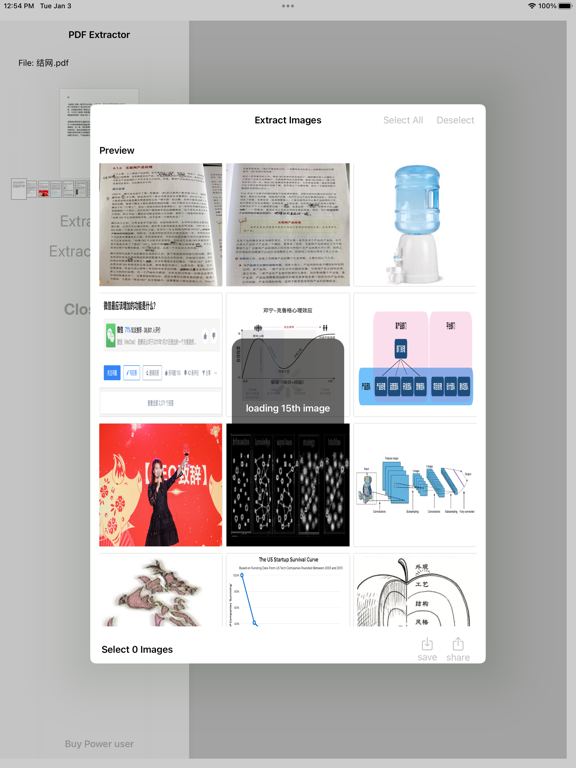
Developer-published product images. Captions identify the platform and source; these are not our test captures.
PDF Extractor
Who it suits
- Investigating a focused extraction workflow on iPhone or iPad
When to choose something else
- A save path requiring verified transparency preservation
- Full PDF editing
- A verified Mac workflow
What reviewers and users say
Our summaries of linked accounts—not our own experience or a vote-based ranking. Older versions and different platforms are labeled. Sources reviewed October 18, 2026.
No third-party evaluation of PDF Extractor’s exact image-extraction task is included in this selection. Our own sample is described separately from third-party accounts.
PDF Extractor · External coverage: We searched the exact product name and App Store ID on October 18, 2026. No suitable independent evaluation of this image-extraction workflow was located for this edition. Store facts and our small, separately labeled iPhone sample are available; this is a coverage gap, not evidence of broad approval or disapproval.
How to read disagreement
Different opinions can reflect different jobs, versions, devices or paid plans. We do not call a few comments “the consensus.” A consequential factual conflict that remains after checking those differences is a candidate for a focused hands-on test. A preference for one interface over another usually is not.
Features & tradeoffs
Features below come from the linked provider documentation. The recommendations above are our editorial interpretation.
- Developer-described image extraction
- Plain and rich text extraction
- Image selection and sharing shown in store screenshots
Our small-sample findings
Both apps recovered the three unique pictures. PDF Extractor saved PNGs to Photos; iLovePDF returned JPGs. Neither preserved the transparent sample. These findings apply to this iPhone run, not every PDF.
Read the test results, method and limitations
PDF Extractor 1.01 returned four PNGs; iLovePDF 4.1.0 successfully returned three JPGs in the follow-up. The fixture contains three unique raster assets placed four times, so three outputs are consistent with resource deduplication, not a missing unique picture. Both retained the sample dimensions; neither returned transparency. PDF Extractor matched the RGB/scan reference pixels, while iLovePDF JPG pixels differed. This limited sample is not an overall ranking; no comparative winner is established.
Known limitation: transparency was not preserved in this saved output. The input contains an RGBA image and a PDF soft mask; the returned 320 × 320 PNG is RGB, with every decoded alpha value equal to 255. We have not isolated whether the loss occurred during extraction, saving to Photos or subsequent transfer. Do not describe this path as lossless for transparent images.
PDF Extractor: returned PNGs
| Sample | Returned dimensions | Observed result |
|---|---|---|
| Repeated RGB picture | 640 × 480, twice | Both returned PNGs match the reference RGB pixels and dimensions. Their file hashes also match each other. |
| Transparency sample | 320 × 320 | Transparency not preserved: returned PNG is RGB, not RGBA. Color channels match, but the alpha channel is absent. |
| Synthetic scanned image | 800 × 1100 | Returned PNG matches the reference RGB pixels and dimensions. |
| Vector-only page | No raster picture expected | No additional vector-chart picture appears among the four returned exports. This is not a missing embedded raster image. |
Workflow and access
The PDF Extractor recording begins with the test PDF already open. It shows image selection, saving four images to Photos, the photo-add permission prompt and opening a saved result. No purchase prompt is visible in this run; the tester reports no paid entitlement. This demonstrates this four-image save only—not an unlimited free allowance or a verified import walkthrough.
iLovePDF: successful follow-up, three unique images
The first import attempt was blocked, but the follow-up recording shows importing the fixture through Documents, choosing PDF to JPG → Extract images, and completing extraction. Three JPGs were returned: 640 × 480, 320 × 320 and 800 × 1100. All three unique raster assets are represented; the repeated placement is not a fourth unique image. This is consistent with deduplication, not proof of a missing picture.
The JPGs retain those dimensions but do not match the reference pixels exactly. JPG output does not preserve alpha transparency. The recording shows one free task remaining out of two for that day after completion; this is an observed counter, not a guarantee of future pricing or allowances.
Sharing friction (tester-reported): saving to Photos was not straightforward, and the tester appeared to need individual AirDrop transfers to the Mac. The supplied recording ends at the results list; it does not demonstrate the sharing attempts or rule out a batch-share option. Batch saving and sharing remain unverified—not established as unsupported.
Device, method and remaining limits
iPhone Air · iOS 27.0.1 (tester-reported). App versions supplied by the tester: PDF Extractor 1.01; iLovePDF 4.1.0. The results apply to the supplied sample and recorded workflow.
We inspected the initial recordings, the successful iLovePDF follow-up, four returned PNGs and three returned JPGs. Comparisons use decoded pixels, not file size or thumbnail appearance. The table above describes PDF Extractor outputs; the iLovePDF findings are separately described below it. The two repeated RGB outputs are intentional placements of one source image, not two distinct source assets. Pixel equality here does not imply identical file encoding, metadata or color-profile behavior.
The recording visually identifies our four-page synthetic fixture, but no input PDF was returned for a byte-level identity check. The controlled reference has three raster assets placed four times, plus a vector-only page. These findings concern this sample and save path only.
Still untested: iPad, batch-sharing options, other save/share destinations, broader free limits, large and protected PDFs, offline operation and network traffic. No speed benchmark or privacy certification is claimed. Raw recordings are not published because they include personal gallery content.
Limitations & considerations
- The returned iPhone sample lost transparency. The stage responsible has not been isolated; do not rely on that save path for transparent graphics.
- The $2.99 Full Access listing does not explain the complete free allowance or renewal terms. iPad support is listed, but the supplied hands-on sample covers iPhone only.
- The store privacy declaration is developer-reported. Local-only processing has not been independently established.
Documented features, attributed opinions and explicitly labeled hands-on observations are different kinds of evidence. We do not infer unmeasured performance or privacy guarantees.
Privacy & permissions
Check the provider’s policy for the exact feature you intend to use. A store privacy label is developer-reported; it is not an independent network audit. We only call processing offline when the evidence establishes that workflow.
Sources
Product facts checked October 18, 2026. Independent and user perspectives, where available, are attributed above. Missing external coverage is not treated as a negative verdict.
- PDF Extractor — App Store
Developer description, screenshots, compatibility and privacy declaration; not independent testing.