Free Photo Background Removers: Device Support and Export Limits
Compare native subject lifting and web background removal by platform, transparency and the file you need to save.

The short answer
On a supported iPhone, start with Apple’s subject-lifting feature for a quick cutout. For a web route, Adobe’s checked background-removal page now presents Firefly and advertises free removal. Canva’s editor documentation identifies background removal as a paid feature, so it should not be listed here as an unrestricted free option.
Side by side
| Your situation | Useful route | Check before choosing |
|---|---|---|
| Quick subject copy on iPhone | Apple subject lift | Device support and destination format |
| Web background removal | Adobe’s current Firefly route | Upload, account and export conditions |
| Canva removal button | Paid-feature boundary | Free layout is not free removal |
Define the output: a cutout or a new background
Removing a background means separating the subject from the surrounding pixels. Replacing the background adds another design step. A transparent cutout is useful for a product page or collage, while a portrait on a new color may be saved as an ordinary flattened image.
Decide whether you need transparency, the original dimensions, a batch of images or just one quick subject copy. These conditions can lead to different tools. A service that provides a good low-resolution preview may not meet a high-resolution product-image requirement.
Apple’s subject lift: the first route on a supported iPhone
Apple’s guide describes touching and holding a subject, then copying, dragging or sharing it into another app. This is a convenient native route when the device and image support the feature. It can be enough for a quick cutout without a separate background-removal subscription.
The destination matters. Pasting a cutout into a document and exporting that entire document may flatten it onto a background. If transparency is required, inspect the saved image in a context that makes the background visible. Do not judge the file solely by a white preview.
Adobe’s web route: follow the current product identity
The checked Adobe Express background-removal URL now presents an Adobe Firefly removal flow. It advertises free background removal and describes accepted input types and upload limits. Follow the current interface rather than expecting the old product branding or screen arrangement.
This is a web-upload route, so consider whether the image is suitable to send to that service. Check the current sign-in and download requirements, output dimensions and any additional editing entitlement. Free removal should not be generalized into a promise that every related Adobe editing feature is free.
Why Canva is a different qualification
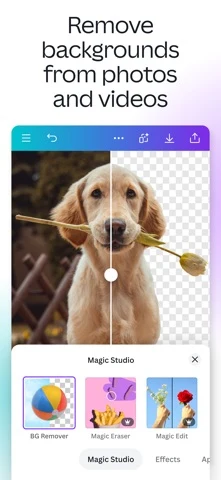
Canva’s editor documentation lists background removal among paid features. Canva can still be useful for arranging an already-created cutout in a design, but that is different from recommending its removal tool as a generally free service.
Keep separate costs separate. A free collage editor may accept a transparent image you already have, while producing the cutout inside the same editor may require an upgrade. Choose the smaller workflow that meets the task instead of paying simply to avoid moving one image between tools.
Image source and original context
Inspect edges and the downloaded file
Check hair, fabric, translucent objects and the spaces between small details. A cutout can look acceptable at thumbnail size while leaving visible remnants around the subject. Place it temporarily on a contrasting background to reveal edge problems.
Confirm that the saved format and workflow preserve transparency when that is the goal. JPEG cannot store an alpha channel. Keep a transparent master and create flattened copies for destinations that require them. If the free route does not provide the needed resolution or edge control, say that clearly before building a large batch around it.
Limitations & considerations
- Check current access and purchase terms for your country and account before paying.
Use the linked official pages for current platform, access and purchase conditions.
Sources & scope
Reviewed October 24, 2026. Product facts follow the linked provider documentation. Selection advice and example prompts are iApp4Me editorial guidance. Screenshots and provider examples are credited beside each image. Availability and plan terms are dated October 24, 2026.
- Apple: lift a subject from a photo on iPhone
Touch-and-hold, copy, drag and share subject workflows.
- Adobe: free background removal
The checked URL now presents the Firefly background-removal flow.
- Canva: photo editor
Mobile and desktop editing, with some features requiring paid access.
No comments yet. Be the first to share your experience.