Transcribe an interview with MacWhisper using a local workflow
Prepare the model, protect the source and review the transcript before sharing it.
 MacWhisper
 Step-by-step guide
The short answer
Choose a local model for a local interview workflow, leave optional cloud actions disabled, and review names and speaker turns against the recording. MacWhisper’s official documentation describes the workflow; optional integrations are separate processing choices.
Is this the right fit?
MacWhisper
macOSTurn recordings into reusable transcripts
Shortlist it when you need transcript editing and exports as well as captions. Pick a local model when the intended workflow is on-device.
The tradeoff: Model, hardware and optional cloud features change the tradeoff. A single reviewer’s speed result is not a universal benchmark.
Free edition · Pro €64 one-time
Vendor website · EUR · 2026-10-18 · Plan details & source
Explore MacWhisper →Editorial selection advice based on the linked product documentation, attributed feedback and any explicitly labeled test results—not a universal winner.
See the apps, not just the feature list
Developer-published product images. Captions identify the platform and source; these are not our test captures.
MacWhisper
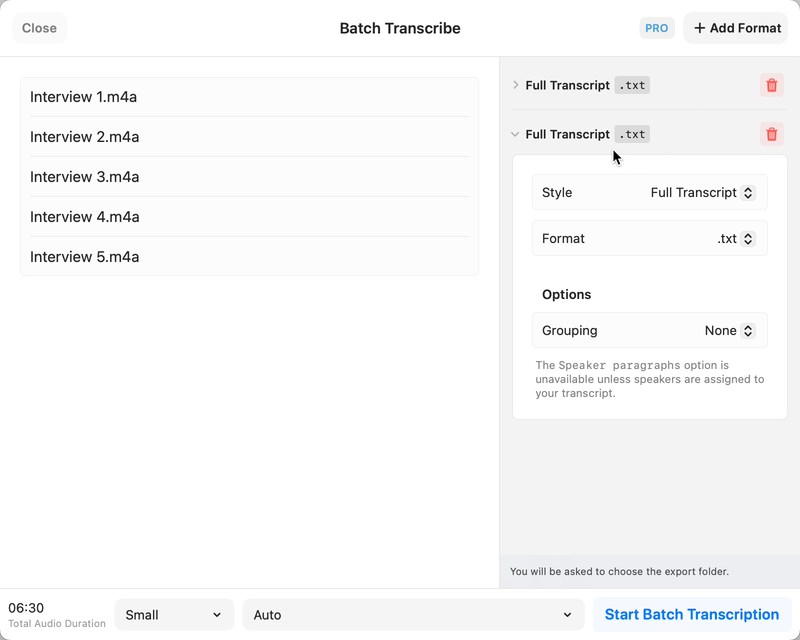
Still from the official batch-transcription demo, not our test capture.
What reviewers and users say
Our summaries of linked accounts—not our own experience or a vote-based ranking. Older versions and different platforms are labeled. Sources reviewed October 18, 2026.
9to5Mac · Zac Hall
Dec 6, 2024 · MacWhisper 11 / 11.1
Hall welcomes the transcript-view redesign and sidebar, and covers the menu-bar dictation workflow.
Read in context: An older release article partly reproducing the developer’s announcement—not an independent accuracy or speed benchmark.
r/macapps · CtrlAltDelve
MacWhisper 12.2-era · Parakeet vs Whisper · M1 Max
This user prefers Parakeet for quickly turning long spoken notes into readable text, while acknowledging errors in names.
Read in context: One recording and one machine, not our benchmark. The post updates an initially reported crash as fixed; do not repeat it as an unresolved current bug.
How to read disagreement
Different opinions can reflect different jobs, versions, devices or paid plans. We do not call a few comments “the consensus.” A consequential factual conflict that remains after checking those differences is a candidate for a focused hands-on test. A preference for one interface over another usually is not.
1. Prepare the interview and destination
Use a staged conversation until the workflow is verified. Keep an untouched source copy and decide who should receive the transcript. Put working files somewhere consistent with your privacy requirement; a local speech model does not prevent a synced output folder from uploading its contents.
Write a short glossary of names and specialist terms. Keep it beside the recording for review rather than expecting speech recognition to know the intended spelling. Record whether speakers overlap or have separate audio channels.
2. Select an appropriate local configuration
MacWhisper’s official materials distinguish local processing from optional AI services. Check the installed edition and select a local transcription configuration before importing the sample. Prepare required downloads first and record the model/settings used. The exact current picker labels and availability must be captured on the device.
Do not enable a summary, assistant or integration just because it appears beside the transcript. A separate action can have a different processing destination. For a strict local brief, exclude unverified actions and test the complete workflow disconnected from networking.
3. Review words and speaker turns
Import the interview through the current file workflow, then inspect the generated text while listening. Correct the opening and ending, all quotations, names, numbers and negative statements. If speaker labels are available in the chosen configuration, verify each change of speaker rather than assuming the labels are identities.
Preserve meaningful hesitations when the task requires a faithful transcript. A cleaned-up reading copy and a verbatim record serve different purposes; label which one you are producing.
4. Export and retain the audit trail
Export a readable text copy for review and, if your task requires captions, a timed subtitle copy separately. Reopen both outside the app. Save a note with device, version, model, processing time and correction time so the result can be repeated.
If the operation is behind a Pro boundary, capture the exact boundary. We have not verified the free edition’s complete interview workflow in the current build and will not describe every advertised feature as free.
Limitations & considerations
- Local models and optional cloud/API integrations are different processing routes; select the route appropriate for the recording.
- Free and Pro features differ. Website Pro licensing and the App Store Whisper Transcription edition are separate entitlements.
Documented features, attributed opinions and explicitly labeled hands-on observations are different kinds of evidence. We do not infer unmeasured performance or privacy guarantees.
Sources & scope
Reviewed October 18, 2026. These are provider-published sources; listings and feature access can change. This article uses the linked documentation; any hands-on observations are separately labeled.
- MacWhisper official website
Official capabilities and free/Pro overview. Local transcription and optional cloud AI are distinct workflows.
- MacWhisper support
Official manual; the installed edition and version must match instructions.