How to Create a Daily Briefing with an AI Agent
Build a short briefing around decisions, source links and deadlines rather than an overflowing summary of everything.
The short answer
Choose the sources, specify a delivery time and time zone, and ask the agent to prioritize decisions over general summaries. Keep the first briefing read-only. A useful output contains a short priority list, links to the originals and a separate set of proposed actions for your review.
Side by side
| Your situation | Useful route | Check before choosing |
|---|---|---|
| Too much information | Limit sources and priority count | Brief should lead to decisions |
| Missing context | Require original links | Distinguish facts from inferences |
| No recurring delivery feature | Use a saved request and reminder | Do not imply unsupported scheduling |
Decide what belongs in the brief
Start with three categories: commitments, unresolved decisions and changes since the previous brief. A calendar supplies time commitments; selected project conversations supply context. Add a news or research source only if it changes an action you need to take.
Leave newsletters, general updates and low-priority notifications out of the first version. A briefing that reproduces the inbox has not saved much attention. Give the agent an explicit size target, such as five priorities and one short paragraph for each, with an overflow list only when something genuinely important does not fit.
Choose sources before connecting more accounts
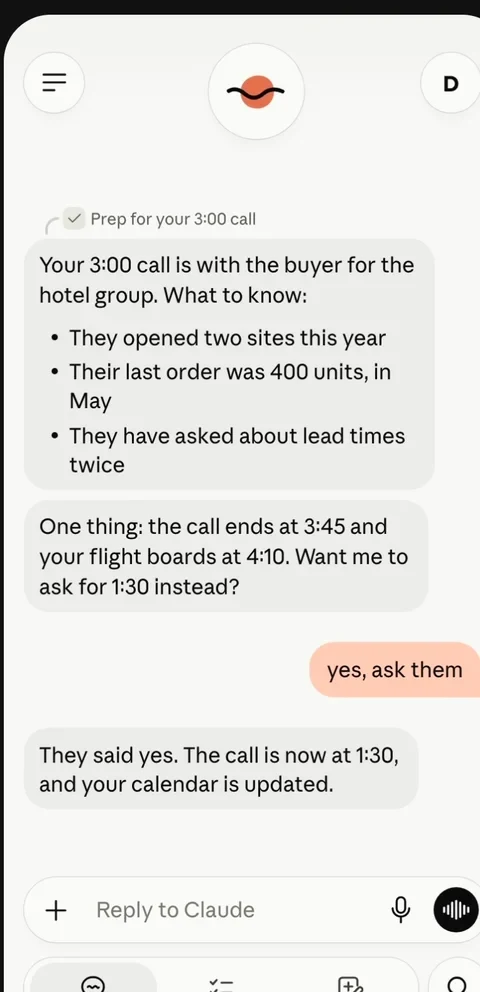
Claude Duet’s launch describes a morning brief based on connected apps. Other agents may support a scheduled task, a continuing request or a manual invocation instead. Check the available mechanism in your own account; do not assume that every chat application can deliver a reliable recurring notification.
Name the specific calendars and project sources. If two calendars contain duplicate events, say which one is authoritative. If a thread includes tentative ideas, ask the agent to distinguish them from confirmed commitments. The quality of a briefing depends as much on source selection as on summarization.
Use a structured request
Example request: “For the next workday, use my work calendar and the two project threads I name. List three decisions, commitments due within two working days and changes since the previous brief. For each item, include its source and due date. Keep reply drafts separate. Use 08:30 Asia/Shanghai only if the account supports that delivery setting.”
Ask for an explicit coverage window, such as 18:00 yesterday through 08:00 today. Otherwise an old unresolved item can be presented as new. Duet’s documented morning brief is a product feature; an arbitrary delivery minute is not established by that description.
Image source and original context
Give the output a predictable shape
Ask for a top section with the date, time zone and coverage window. Then request priorities, upcoming commitments and items needing your decision. Put suggested replies or calendar changes in a separate section so they cannot be mistaken for completed actions.
Each factual item should link to its source. A brief that says a client is unhappy should point to the relevant message, not merely infer a mood from a short reply. Where sources disagree, ask for the disagreement and the question that would resolve it. That makes the brief a decision aid rather than an uncheckable narrative.
A brief you can actually scan
Use this output shape: “Decision / due date / source / change since yesterday / next action.” For example: “Approve workshop agenda / today 14:00 / project thread / two new speaker constraints / review the attached draft.” The example is a format, not a claim about a real meeting.
After three briefings, remove a source that produces no decisions and add a missing authoritative calendar if necessary. Keep calendar alerts for urgent deadlines: the Duet guide explicitly says an urgent item can arrive between account checks.
Limitations & considerations
- Check current access and purchase terms for your country and account before paying.
Use the linked official pages for current platform, access and purchase conditions.
Sources & scope
Reviewed October 24, 2026. Product facts follow the linked provider documentation. Selection advice and example prompts are iApp4Me editorial guidance. Screenshots and provider examples are credited beside each image. Availability and plan terms are dated October 24, 2026.
- Anthropic: introducing Claude Duet
Launch announcement, October 21, 2026.
- Anthropic: get started with Claude Duet
Eligibility, setup, connectors and current preview limits.
- Meta: introducing Muse
Launch and product positioning; updated September 30, 2026.
No comments yet. Be the first to share your experience.