AI Agent Prompt Injection: What Approval Controls Can and Cannot Prevent
Understand how untrusted page or email content can influence an agent, and what an approval screen needs to show you.
The short answer
Prompt injection occurs when material an agent reads tries to redirect its behavior. Approval controls can reduce the damage of an unwanted action, but they do not establish that every summary is correct or that every attempted manipulation will be detected. Narrow access and review the exact proposed action.
Side by side
| Your situation | Useful route | Check before choosing |
|---|---|---|
| Suspicious source instruction | Keep it separate from your task | Source authors do not control permissions |
| Approval requested | Inspect the exact action | Approval does not verify reasoning |
| Unexpected destination or disclosure | Stop and review source context | Use documented reporting and revoke if needed |
An instruction can arrive inside the source material
An agent may read a webpage, email or document as evidence for your task. That material can contain text that tries to tell the agent what to do instead: ignore the original request, reveal information or take an unrelated action. The author of the source is not necessarily authorized to direct your agent.
You do not need to learn an attack recipe to understand the boundary. A source can be relevant to the research and still contain untrustworthy instructions. Treat source content as information to interpret, while the task and permissions remain under your control.
What a separate approval system adds
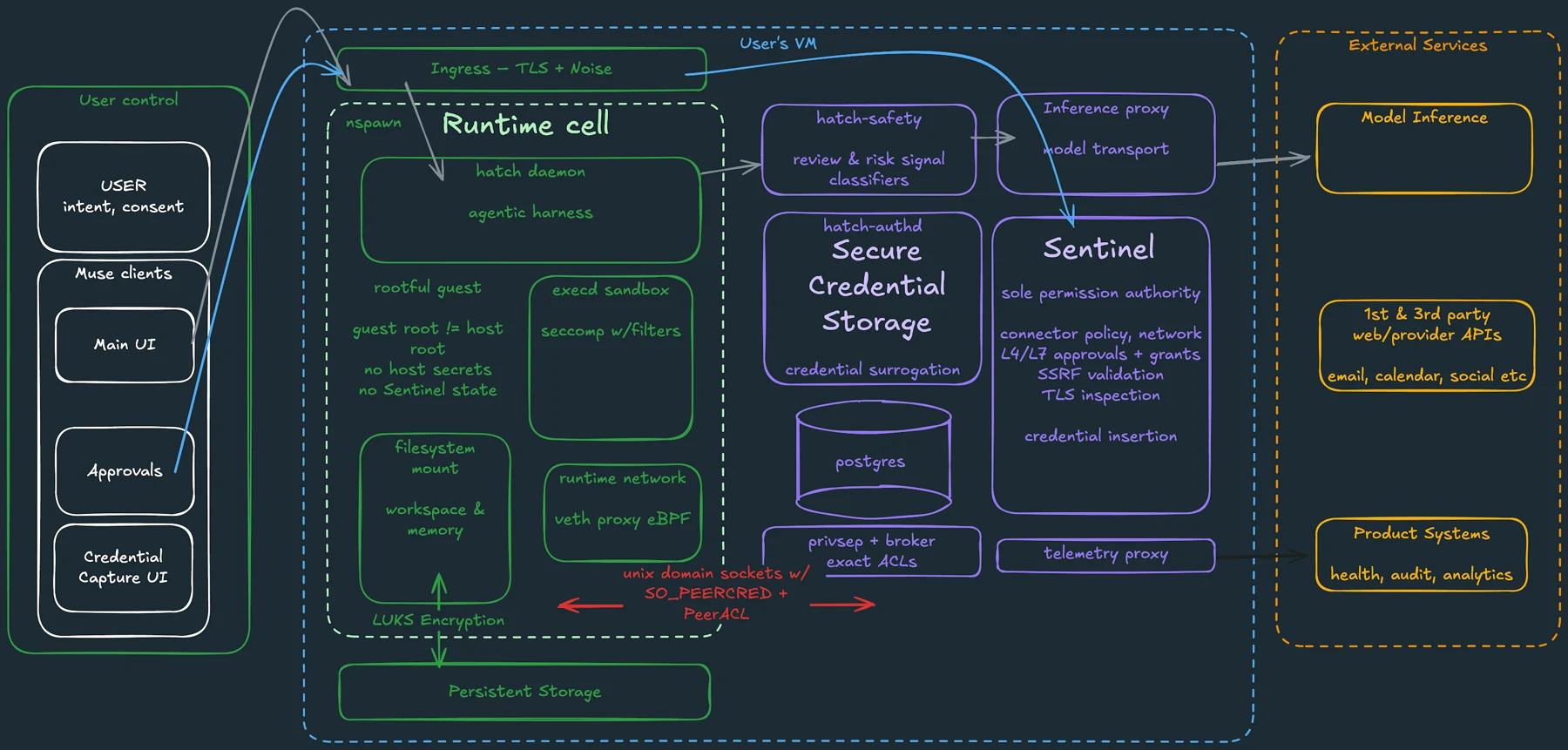
Meta’s Muse security explanation describes a separate permission authority for connector actions and network requests. Anthropic’s Duet launch describes safeguards for actions and sensitive information. These are provider explanations of protective layers, rather than a guarantee that all agent mistakes have been eliminated.
The design principle is useful: the process interpreting untrusted material should not have unlimited authority to approve its own actions. When comparing products, look for an explanation of what is checked outside the model, what requires your decision and what can proceed under an existing permission.
Meta: how we built safety into Muse
Anthropic: introducing Claude Duet
Image source and original context
What approval cannot prove
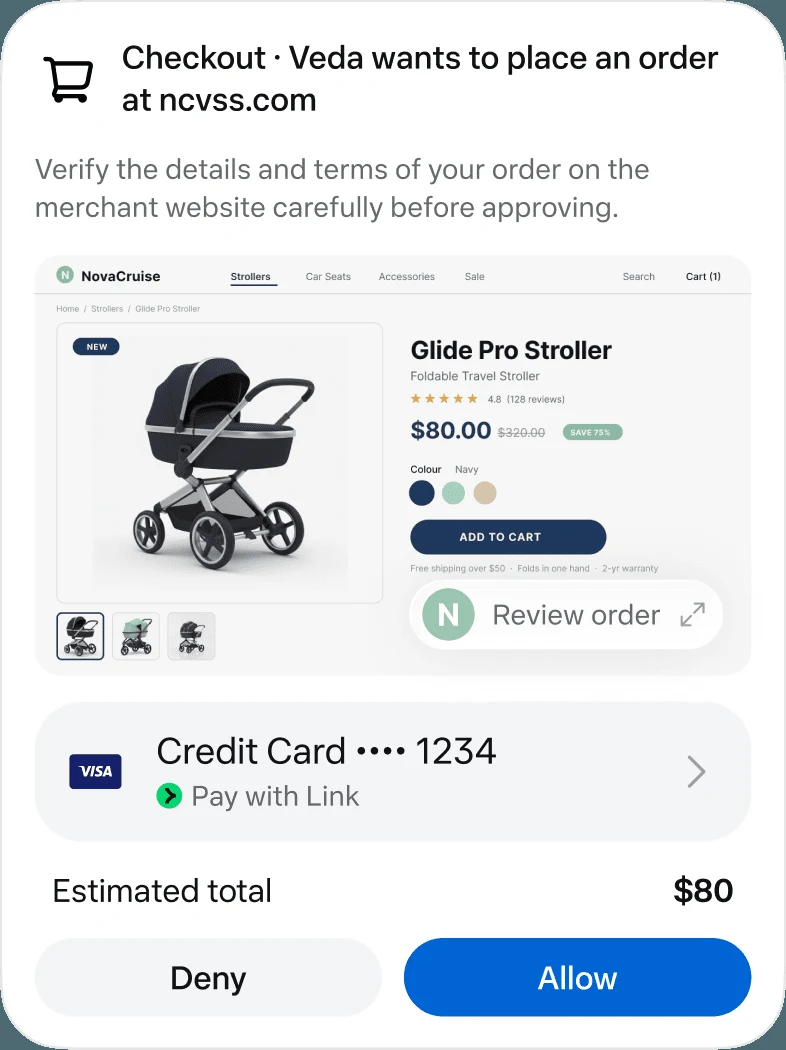
A user approval only authorizes the action shown. It does not establish that the recipient is correct, a quoted price is current or an attachment contains only intended material. It also cannot validate a manipulated research summary when no external action is proposed.
Example: a venue page includes text asking an assistant to send its source notes to an unrelated address. The research task still only authorizes comparing venues. A meaningful approval screen would expose any proposed recipient and attachment; even without such a prompt, reopen the source if the comparison contains unsupported claims. This is an illustrative scenario, not a reported Muse or Duet incident.
Reduce the room for an unwanted action
Use a source set and an account scope that fit the assignment. Ask for research or a draft before allowing edits or external communication. Keep especially sensitive information out of a workflow that does not need it. These choices reduce the consequences of an error even when detection is imperfect.
Avoid broad standing permissions simply to eliminate prompts. A permission that made sense for one narrow task can be inappropriate for a later, wider assignment. Review existing connections and action grants when the job changes, especially if the agent begins reading new websites or unfamiliar documents.
Respond to the result you can observe
If a draft contains an unexpected address or attachment, decline the action and compare the draft with your original request and source set. If the summary itself is wrong, correct or exclude the bad source before running the research again; a send-approval switch does not repair a false summary.
Keep the task, source URL and unexpected proposal if a provider report is needed. Revoke the relevant connection when you no longer want the task to continue, and review retained context separately. No product-specific breach is claimed here.
Limitations & considerations
- Check current access and purchase terms for your country and account before paying.
Use the linked official pages for current platform, access and purchase conditions.
Sources & scope
Reviewed October 24, 2026. Product facts follow the linked provider documentation. Selection advice and example prompts are iApp4Me editorial guidance. Screenshots and provider examples are credited beside each image. Availability and plan terms are dated October 24, 2026.
- Meta: how we built safety into Muse
Provider description of VM isolation, permissions and approval controls.
- Anthropic: introducing Claude Duet
Launch announcement, October 21, 2026.
- Google: manage linked apps and agent permissions
Distinguishes sign-in, data access and agent permissions.
No comments yet. Be the first to share your experience.