How to Get Started with Claude Duet: Access, Setup and First Tasks
Follow the official access route, prepare your account and make the first assignment easy to review.
The short answer
Join the official Claude Duet waitlist with the email used for your Claude account. The checked research preview requires an invited US Pro or Max account. Once invited, follow the provider’s setup link and begin with one small task before adding more connections.
Side by side
| Your situation | Useful route | Check before choosing |
|---|---|---|
| No invitation | Use the official waitlist | Matching email and eligible account |
| Invitation received | Follow its setup link | Correct Claude account |
| Ready for first task | Ask for a small source-linked brief | No accidental action permission |
Check access before looking for a download
The checked preview requires a US Claude account, Pro or Max, and a waitlist invitation. On the official product page, choose Join the waitlist, enter the email associated with Claude, select the plan and phone type, then submit. Invitation timing is not guaranteed.
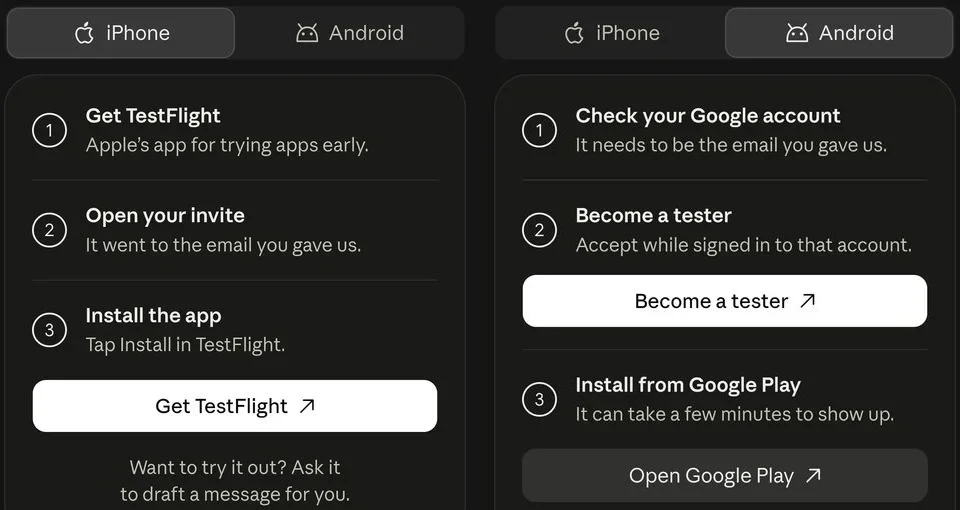
When invited, open the email on your phone and follow its iPhone or Android setup route. Use the Apple or Google account associated with the invited email, then sign in to Claude. The guide says activation can take a few minutes. Reinstalling will not fix a mismatched account or missing invitation.
Prepare one job and its source material
Before setup, choose something you can review in a few minutes. A meeting brief from one calendar and a small set of messages is a good example. List the expected contents: purpose, attendees, relevant links and questions to resolve. Exclude sending replies from the first assignment.
Remove ambiguity about time. “Tomorrow morning” can mean different things across accounts and time zones. Include a date, a time zone and the point at which the information becomes stale. For work material, use an account and documents you are allowed to connect.
Follow the invitation, then inspect the connections
Anthropic’s guide says to open the invitation on the phone and follow its setup steps, then sign in with the Claude account. Duet can use existing Claude connectors, so review what is already connected rather than assuming the new app begins with no access.
Write a small inventory for yourself: service, account address and purpose. If a calendar connection points to a personal account but the task concerns work meetings, correct that mismatch before assigning the task. Add only the connection needed for the assignment; a long integration list is not a setup checklist.
Send a request with a visible finish line
Use a request like this: “Prepare a brief for my meeting on Tuesday. Use the calendar event and the project thread I identify. Include links, unresolved questions and a suggested agenda. Prepare drafts only; ask before any external action.” Adapt the inputs to the services currently supported in your account.
Open the returned files and source links. Confirm the date, the people and the distinction between quoted information and suggested next steps. If something is absent, ask for the missing field rather than restarting with an even broader instruction. A specific correction is more useful than “try harder.”
Image source and original context
Find the result and handle the first failure
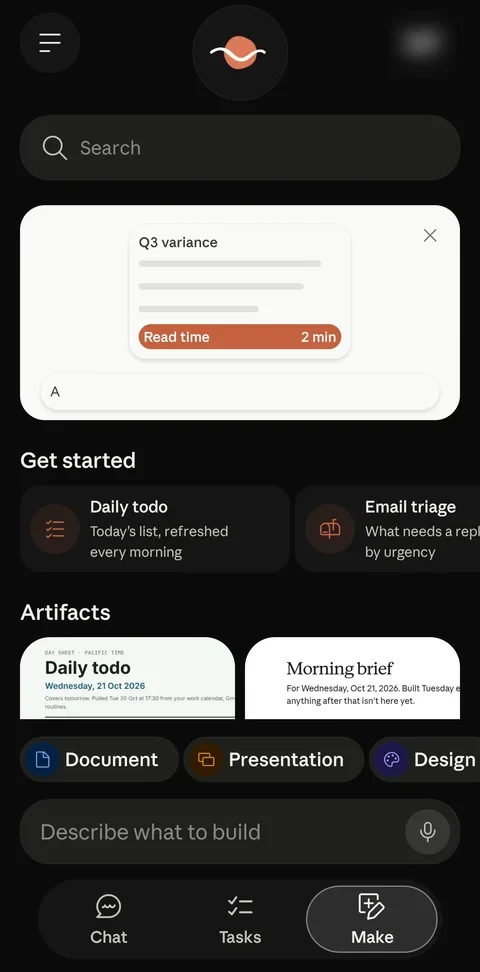
Use Tasks to find work awaiting your input; finished files appear in Make. Open the file and its source links before marking the task complete. Duet may suggest completion, but its help guide says only you can mark it completed.
If the first task fails, distinguish access from output: a missing source requires checking its connector and account; a wrong date requires correcting the brief; a Microsoft 365 requirement needs another route while that connector remains unavailable. Do not connect additional unrelated apps to troubleshoot a specific failure.
Limitations & considerations
- Check current access and purchase terms for your country and account before paying.
Use the linked official pages for current platform, access and purchase conditions.
Sources & scope
Reviewed October 24, 2026. Product facts follow the linked provider documentation. Selection advice and example prompts are iApp4Me editorial guidance. Screenshots and provider examples are credited beside each image. Availability and plan terms are dated October 24, 2026.
- Anthropic: get started with Claude Duet
Eligibility, setup, connectors and current preview limits.
- Anthropic: Claude Duet
Official product and waitlist entry point.
No comments yet. Be the first to share your experience.